My link blog is up and running.
It shares the same theme as my blog and there’s links to each so you can switch back and forth.
I’ve still got a few more pages to add that should make it more than just a blog of links.

Family guy and web developer
My link blog is up and running.
It shares the same theme as my blog and there’s links to each so you can switch back and forth.
I’ve still got a few more pages to add that should make it more than just a blog of links.
I really love these social network ideas, especially the allotments idea.
A social network built like an allotment. The whole network is a grid of 128 plots. Each plot is a possible user page for someone to write posts and share images. If all 128 plots are occupied, new users join a waiting list. Each user has to tend to their plot once every 7 days by posting something. If they don’t, after a grace period, their plot gets composted and offered to the next person on the waiting list. But beneath that new person’s posts, visitors can still see the compost of all previous people who tended this plot. There’s no ‘wall’ or ‘general feed’ - visitors can visit individual plots and see what’s growing there.
— Some ideas I’ve had for social networks by Raphael Kabo
I floated an idea for a social network made up of a very limited number of people. Each member of the network is given the ability to post something to the network. Once they post something, the next member of the network is given the ability. Members keep taking turns until they decide to leave. I still needed to work out some specifics, but I liked the idea of taking turns posting.
The last few weeks have flown by. A good measure of just how quickly time has moved is the week number of the NFL season. We’re already coming up to the halfway mark, and the next few weeks will decide who’s got a serious chance at making the playoffs.
The halfway mark is when teams take stock, so it feels like a good time to do the same. I’m going to start posting my intentions each month as a little written commitment for the weeks ahead.
Dailymuse, my personal newsletter product, is motoring along nicely, and I’m really enjoying using it every day. This month’s focus is finishing the upgrades to the payment gems. I put off updating these for too long, and now I’m paying for it, one version at a time.
Laurel, my bookmarking manager, has been quiet of late. I haven’t been saving much to it, partly because its admin screen is separate from the web app I use to update my Jekyll blog. That extra step is enough to put me off. So for November, I’m going to add bookmark saving to that web app. Once that’s done, I’ll give Laurel the same CSS as my blog and move it to a subdomain.
I’ll check back on my progress in another post in December. I hope to keep this going through next year.

Making the most of a calamitous situation this morning by grabbing a nice photo of the 15th green at the golf course.
I’ll be honest: I didn’t start the week planning to build my own Markdown editor for macOS, but by Thursday night, I already had something that worked.
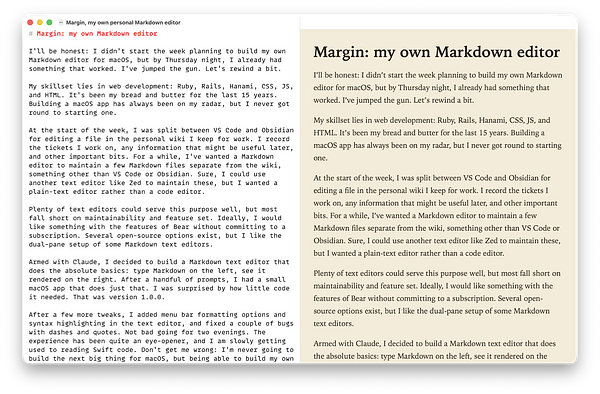
I’ve jumped the gun. Let’s rewind a bit.
My skill set is in web development: Ruby, Rails, Hanami, CSS, JS, and HTML. It’s been my bread and butter for the last 15 years. Building a macOS app has always been on my radar, but I never got round to starting one.
At the start of the week, I was split between VS Code and Obsidian when editing a file in my personal work wiki. I record the tickets I work on, any information that might be useful later, and other important bits. For a while, I’ve wanted a Markdown editor to maintain a few Markdown files separate from the wiki, something other than VS Code or Obsidian. They’re scratchpad files I keep around and usually clear out at the end of the week. Sure, I could use another text editor like Zed, but I wanted a plain-text editor, not a code editor.
Dozens of Markdown editors could serve my purpose. Then I thought, “What if I tried to build my own?”
And so, Margin was born. I didn’t spend long on the name. All I knew was that I planned a feature involving the margin itself, so the name stuck; the feature will come later.
Armed with Claude, I decided to build the absolute basics: type Markdown on the left and see it render on the right. The first prompt delivered a rather basic but working Markdown editor. After an hour or two, I had a small macOS app with a couple of additional changes: themes and file loading and saving . That was version 1.0.0.
After a few more tweaks, I added menu bar formatting options and syntax highlighting in the text editor, and fixed a couple of bugs with dashes and quotes. Not bad for two evenings. The experience has been quite an eye-opener, and I am slowly getting used to reading Swift code. Don’t get me wrong: I’m never going to build the next big thing for macOS, but being able to build my own app, even slowly, has been quite liberating.
The application itself is mostly SwiftUI. The only exception is the text editor, an AppKit view embedded in the SwiftUI layout. For the most part, Swift isn’t far removed from other languages I’ve used, but it will definitely take a while to get familiar with it.
For those interested, Margin is open source, but it’s not a typical open-source application. You can read the code, download it, and even run it if you choose, but I am building Margin just for me, so I’m not looking for contributions.
I’ll keep working on this a couple of hours a week and see where it takes me.
Nice to see that CSS Tricks is once again under independent ownership.
Good luck to Geoff Graham and all the CSS Tricks team!
It’s hard to believe we have a weather warning for later in the day when the day starts like this.

Loving the new look for Mastodon 5.0.

I played 18 holes this morning with Drew. Good to see him getting more technical with his golf.
Sun low in the sky, a roast in the oven, apples stewing for later tonight, the Packers on television shortly. Pretty much a perfect evening ahead.