
Margin: my own Markdown editor
I’ll be honest: I didn’t start the week planning to build my own Markdown editor for macOS, but by Thursday night, I already had something that worked.
I’ve jumped the gun. Let’s rewind a bit.
My skill set is in web development: Ruby, Rails, Hanami, CSS, JS, and HTML. It’s been my bread and butter for the last 15 years. Building a macOS app has always been on my radar, but I never got round to starting one.
At the start of the week, I was split between VS Code and Obsidian when editing a file in my personal work wiki. I record the tickets I work on, any information that might be useful later, and other important bits. For a while, I’ve wanted a Markdown editor to maintain a few Markdown files separate from the wiki, something other than VS Code or Obsidian. They’re scratchpad files I keep around and usually clear out at the end of the week. Sure, I could use another text editor like Zed, but I wanted a plain-text editor, not a code editor.
Dozens of Markdown editors could serve my purpose. Then I thought, “What if I tried to build my own?”
And so, Margin was born. I didn’t spend long on the name. All I knew was that I planned a feature involving the margin itself, so the name stuck; the feature will come later.
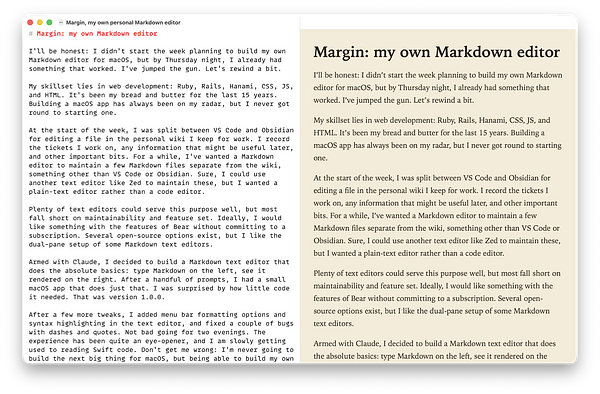
Armed with Claude, I decided to build the absolute basics: type Markdown on the left and see it render on the right. The first prompt delivered a rather basic but working Markdown editor. After an hour or two, I had a small macOS app with a couple of additional changes: themes and file loading and saving . That was version 1.0.0.
After a few more tweaks, I added menu bar formatting options and syntax highlighting in the text editor, and fixed a couple of bugs with dashes and quotes. Not bad for two evenings. The experience has been quite an eye-opener, and I am slowly getting used to reading Swift code. Don’t get me wrong: I’m never going to build the next big thing for macOS, but being able to build my own app, even slowly, has been quite liberating.
The application itself is mostly SwiftUI. The only exception is the text editor, an AppKit view embedded in the SwiftUI layout. For the most part, Swift isn’t far removed from other languages I’ve used, but it will definitely take a while to get familiar with it.
For those interested, Margin is open source, but it’s not a typical open-source application. You can read the code, download it, and even run it if you choose, but I am building Margin just for me, so I’m not looking for contributions.
I’ll keep working on this a couple of hours a week and see where it takes me.