Matthew Lang avatar

AI

Artificial intelligence, large language models, and the tools built on top of them.

Moving to GitLab

Tonight I moved all my personal projects over to GitLab following Sourcehut’s changes to their terms of service regarding LLMs. I’m still not entirely convinced that my projects are in breach of these terms, but I’m making the move anyway.

I have some changes to do to my Rails application that I use to publish posts and upload images to my blog, so I am having to write manual posts at the moment, but it shouldn’t take me long to get this application updated to work with GitLab.

I still have another account to move from Sourcehut to GitLab, but I can take my time with that one.

Time for a new forge

I need to find a new forge now that Sourcehut is prohibiting the use of LLMs. There’s an interesting discussion about this on Lobsters.

I’m still trying to assess whether I am in breach of this with the two paid accounts I have at Sourcehut. The change to the terms is minimal, but I am not entirely convinced that I am breaking the terms and conditions of their service. With these two accounts, I have used LLM tools to generate code that, for the most part, I have amended before committing it.

I also have a repo for a web application I used to publish the content for this blog, which calls on an external LLM to generate alt text for images.

But better to be safe than sorry, so I think I will end up moving these accounts elsewhere. GitHub is out, so I am looking at GitLab again and perhaps Codefloe, which has the benefit of being hosted in Europe, but is only supported by donations. Self-hosting isn’t an option for me. I don’t have the time to maintain my own forge.

A shame that I am making this move, because I like the Sourcehut product. It’s minimalist and does everything I need it to.

I had hoped to try out Claude Design with a couple of Rails applications this morning. Disappointing start so far.

You can only link code from a GitHub profile, which I don’t use, or using a local folder through the browser, but you need Chrome or Edge to do that.

Guess I’ll need to wait a while.

I might have found a notes system that sticks

I’ve tried a lot of different systems for note-taking and task management over the years, but one downside of each has been the time needed to maintain its organisation to a level that keeps it useful. I have lost track of how many different systems and methods I have tried, but I always ended up with a small collection of notes until I settled on the Bear notes app a few years ago. Even using the Bear notes app, though, I was still not 100% settled on using it and wanted something more from my notes. And that’s where the LLM wiki pattern came in.

The LLM wiki pattern, described here as a GitHub Gist, has been an absolute game-changer since I started using it last week. The gist on GitHub explains the system and how the LLM can help maintain your wiki over time.

The migration

It hasn’t taken me long to migrate my Bear notes and Instapaper queue to Obsidian, and, coupled with the ability to automate parts of the schema and for the LLM to handle management of concepts, entities, and summaries, I have managed to get my current notes in Bear to a better shape than I have ever had them in before. Migrating my Bear notes and Instapaper queue to this new system was quite expensive in terms of LLM usage, but I managed to spread it out over a few days.

What I am left with after this initial migration is a list of 150+ articles from my Instapaper queue that I need to vet and decide whether to keep in my notes. I’ll be doing these in batches of five or six each morning to avoid burning through my Claude Pro subscription. I found out early on that this process of fetching and summarising articles can be quite expensive in terms of token usage.

The benefits

My notes are now plain text Markdown files once again. Many note-taking apps use Markdown, but not many of them allow you to access your notes as files and update them outside of the app. Having plain-text files means I am not tied exclusively to Obsidian, and I can use other tools with them if I want to. They might not always be in the right format or syntax for linking between notes, but they are in a fairly common format that is easy to update and migrate.

I am also choosing not to sync these notes to my phone. The intended outcome is that anything I need to do with my notes should be done on my laptop during a dedicated time slot for that task. This should also reduce the amount of time I spend on the phone, which is never a bad thing.

I am migrating my tasks from Things to a separate section of the wiki, still within the same vault in Obsidian. The structure of these files is based on Nicholas Bate’s six compass points, and is a mixture of projects, notes and next actions. The six compass points allow me to allocate a project or task to a specific compass point and make organising such items much easier. The big benefit of this system is that, while I can allocate tasks across different compass points, I can bring all of them together into a single view in Obsidian using the Dataview plug-in.

So far, so good

The LLM wiki pattern is great because it does most of the work for you. It maintains the index, summaries, fetches and breaks down sources for you. I’m quite happy to review additions as they come into the system, but the self-organisation of the information is what makes this a quite powerful tool.

There are other benefits to this, but the big one for me is that the information across my wiki is back to plain text again. I’m happy to have a collection of files I can maintain myself if needed.

I admit it’s early days with the LLM wiki pattern, but the gains from it over the first week have been impressive. In a few months, I’ll touch back on its usage, what I have changed with it, and whether I will continue using it.

James Somers asks if we can achieve more time offline with AI.

Could we get the best of both worlds? In other words, shouldn’t one goal of rapid technical advancement be some melding of the physical and virtual worlds such that I can sit quietly in an easy chair with pen and pad; or lay cards out on a table to organize my thoughts; or turn a room into the embodiment of a project; and yet have the same flexibility, portability, persistence, and remixability as in the digital versions of these things?

I love the idea of advances in AI that let us spend less time looking at screens.

I’m not on board with a fully automated agent-driven programming process. It might have its uses in certain scenarios, but as a solo developer, I have my own process. Research and write a detailed prompt, review and refine the results, and ship the final code when I am good and ready.

This morning, I watched Steve Schoger of TailwindCSS take an AI-generated landing page and refine it using Claude Code. Interesting watching how Steve used just the bare bones of Claude Code to achieve the final result. There were definitely some great tips in here worth checking out.

I found myself in a rabbit-hole this morning asking Claude what it would take to be able to re-build a version of Darklands that can run on macOS or the web. A conservative estimate is 1 year. It was one of the first RPG games that I bought for our first PC and I would spend hours playing it.

Building memory with my own tooling

I’ve been building a fair number of Rails applications using Claude Code recently. Here are a few things I have built in the last few weeks using agentic coding:

  1. An application to support my Jekyll blog - This application replaces the Micro.blog features that I lost when I cancelled my subscription. I can now blog with just my phone if needed.
  2. A bookmarking application - I’ve wanted this for a while, but it’s only been in the last few weeks that I’ve got round to this. It uses an algorithm to age bookmarks over time so I can keep an eye on the front page. If it falls off over time, then whatever. It beats the traditional bookmarking apps I have used in the past.
  3. A dashboard of my projects - I use a slimmed-down version of Shape Up for my projects, but the hill chart feature in Basecamp is something that I find really useful. I’ve been implementing a similar tool for my own process.
  4. An authentication portal for all of the above - This is a very recent addition, and while it’s not quite complete yet, it aims to remove the hindrance of having to remember different logins for different applications.

Agentic coding has made it much easier and quicker to iterate on personal applications. The productivity gains from this have been great, and the fact that these are just personal applications for me means I don’t need to worry too much about making the code understandable to others.

My recent adoption of SQLite3 as the database for these types of applications has made them much easier to manage and more cost-effective to run. As these applications are only for my use, I don’t need a dedicated database server; I can run the application on a server, and the SQLite database can sit in a shared folder for each application—a significant cost saver. Also, since each database is just a file, I can back up these files to another directory or copy them to my laptop as a backup.

What’s become clear from building these applications, though, is that I am trying to build some memory with these applications. The support application for my blog keeps me from losing the friction-free posting I had with Micro.blog. The bookmarking application provides an immediate picture of my recent bookmarks. The dashboard application provides context on where I am with my projects, and the authentication portal eliminates the need to remember multiple usernames and passwords. These applications not only help me on a technical level but also save me a lot of time by letting me avoid having to remember certain things.

Yes, these applications are built using agentic coding, tailored to what I need, and are most likely useless as open-source applications for others to use. Still, they work for me, and that’s enough—personal tools that fit my way of thinking, something that many SaaS applications can’t do.

I used Claude’s Cowork for the first time tonight. I have an archive of a website on my laptop, and each image and document from the website is in its own folder. I used Cowork to consolidate all the images and documents into a single folder. I can see myself using this more in the future.

Finding the balance with AI dev tools

As a relatively late adopter of AI tools, well, amongst software developers anyway, I am slowly coming round to the benefits of AI. Like most people, I started with the big-name AI tool, ChatGPT, but it didn’t take me long to discover Anthropic and their Claude and Claude Code tools.

Over the last six months, I’ve been a heavy user of Claude Code. It definitely provides serious productivity gains. Here are a few examples of where I have used Claude Code in the past few weeks.

  • Upgrading a couple of Rails applications from 7.0 through to the latest 8.1 - The Rails upgrade process is fairly straightforward, and I’ve done quite a few upgrades over the years. Using Claude Code with this has sped up the upgrade process.
  • Re-starting development on Dailymuse - work on this has been slow over the last couple of years, but the last few months have seen some big changes in my micro-product.
  • Exploring Hugo and Jekyll themes - I had been working on a Hugo theme I planned to use on Micro.blog, but since moving to self-hosting, I have migrated this over to Jekyll.
  • Built supporting tools for my blog - Self-hosting with Jekyll is easy, but I wanted to still have the option of hosting images and posting on the go as I used to with Micro.blog. I managed to build a number of these features to support my Jekyll blog over the course of a week.

The accelerated pace of development is probably the first thing software developers notice when using AI tools like Claude Code. You can build features and even applications at such a rapid pace, which is good, but it’s also been a red flag for me since I started using these tools.

With increased production rates, I am concerned about retaining the knowledge of what I am building. Will I know enough about the code base to support it in the future? When my code breaks, how will I know how to fix it?

I am exploring a few ways of ensuring that I know the code that I am shipping, including:

  • Taking notes on code changes, especially in areas of the code base that are important and application or business-critical.
  • Adding more comments to my code - this might serve the AI tools more than me, but having comments throughout the code does give me a quicker understanding of the code I am adding and where I am adding it to.
  • Spending more time reviewing code — especially AI-generated code. What is this code doing? Do I understand it? Can I make this code better? Is this code even suitable?

There are other ways I can improve my retention of the codebase, and yes, AI tools can help with that. However, as good as the AI tools are, there still needs to be human understanding of the codebase to make the right decisions about future changes, and that begins with understanding the code and ensuring I retain enough knowledge about it.

Where I am with AI tools

When it comes to AI, I found myself late to becoming a regular user of it. Hesitance has always been one of my traits, and when ChatGPT became a daily buzzword in my RSS feeds, I wondered if I should start exploring its use. I put it off for a few months, and eventually, I found myself with a ChatGPT account. The initial hype surrounding these tools has definitely fizzled out for me, and now I find myself still divided on whether they are helpful or not.

As a software engineer, I find AI tools really helpful. I’m pretty familiar with the various coding tools available from Anthropic, Microsoft, and OpenAI, and I use at least two of these tools daily; in fact, we’re encouraged to utilise these tools. I use them to explain code that I am unfamiliar with, diagnose issues and help with complex problems that my current skill set does not cover.

Outside of my day job as a senior software engineer, though, using AI becomes more of a crutch than a benefit. I have used AI tools outside of my career for several trivial tasks. But over time, I have found myself falling away from these tools and only reaching for them when I absolutely need them. There’s definitely a downside to these tools when you start to depend on them for everything, and it’s for this reason that I try to limit my time with them.

I think it boils down to that old adage, “everything in moderation”. And yes, this even applies to AI for me.

Say hello to Hooknook

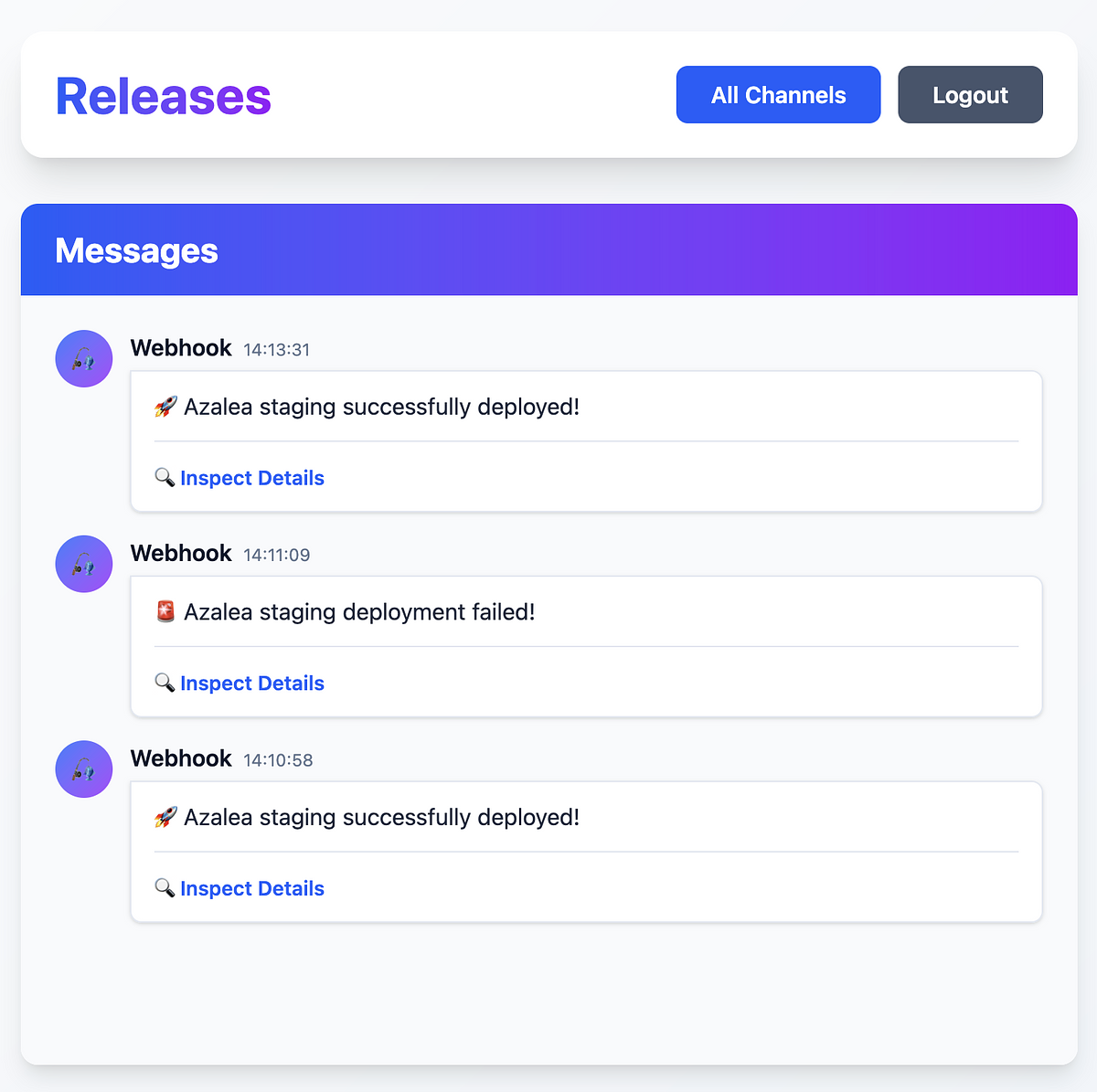
Yesterday, I mentioned that I had created a Slack account just to send webhooks to and that perhaps there was a better way of doing this. After a few hours, I have managed to put together a tool for consuming and monitoring webhooks.

Hooknook (working title) allows me to create channels and send webhooks to different channels. I’ve still got some details to sort out, but the basic application works. Users and channels are made through the Rails console at the moment, and a single endpoint accepts all webhooks coming in. It’s the absolute minimum I could do to get it to work, and now it’s happily accepting webhooks from my Hatchbox deploys.

I used Anthropic’s Claude to flesh out the structure of the application to begin with, and once I had it working, I used Claude again to add some TailwindCSS styling to the screens. These screens are definitely going to get a once-over again, as the purple is a bit garish, but my wife seems to like it, so it might stay, but be a bit more subtle.

It’s been a welcome change of pace to be able to build something in a short space of time, and even better to be able to use it.

Over the next couple of weeks, I plan to explore adding more functionality for Hooknook and being able to handle more webhooks from different sources, including GitHub.

A user interface displays a Releases page with messages about deployment statuses, including both successful and failed updates.

Dave Winer, with a preference for ChatGPT, I would also love to see implemented.

I want a ChatGPT pref that lets me turn off human impersonation. I want it to behave like a search engine. I ask questions, it answers. Period.

Back to school with AI?

In a couple of weeks, it’s the start of another school year here in Scotland. Another to-do list comes with the usual items for this time of year. School uniform, school bag, topping up the meals account and many other things. I’ve added another potential item to the list.

AI subscription.

ChatGPT, Claude, Gemini and the many other AI subscription services became popular at an ideal time for my oldest. He was in his final year of school. He was curious about how it could be used to aid his homework and studies. I showed him how I use it for my own coding and learning, and its benefits.

He used it to his benefit in his first year of college and finished with good grades in his coursework. I also reinforced to him that it shouldn’t be used to do the work for him. Research, yes; learning, yes, but final essays and coursework should be his work and his work alone. He’s now off to college in the US in a couple of weeks, and I think he’ll use it well to help his studies.

My youngest is going into his second year of high school, and now I am wondering if I should be onboarding him to AI tools to help his studies. In his first year of high school, he didn’t get much homework, and trying to ensure he was on the right level for his age was difficult. My thought process behind introducing him to AI tools at this age is to show him how to use these tools correctly and not just use them as copy-and-paste tools.

AI tools are here to stay, and my hope is that by onboarding him to these tools early, he uses them correctly and enhances his learning. I’m also hoping that he finds another use for them beyond schoolwork. He’s pretty creative and has a good imagination. It’s a quality that his teachers commented on in primary school, but in high school, he’s yet to find an outlet for this. It might be that introducing him to these AI tools now would not only help his schoolwork but also provide him with access to other topics he might want to learn about.

The more I think about it, the more I am convinced that introducing him now to these tools is the right move, and in doing so, would ensure that he’s comfortable with AI tools and how to use them appropriately.

Juggling some apps again

I’ve been juggling several app changes over the past few weeks.

Gone are the GitHub and Copilot accounts and subscriptions I used to build a product. I’ve replaced them with a GitLab account on the free tier. The GitLab free tier offers quite a lot compared to GitHub, but there are downsides, like no security alerts. However, I can manage for the moment. I’m still not sold on the GitLab Duo subscription, but I’ve covered that with the following subscription change.

I upgraded my ChatGPT account to the Plus plan over the last month, and I think I will keep it for the immediate future. It’s not quite as integrated as Copilot when it comes to assisting with coding, but it works well for diagnosing issues in my code when needed. I also use it more when searching the web for something specific. I still use DuckDuckGo for general searches that I can filter by the most relevant results, but I use ChatGPT for more targeted searches.

Finally, after a few months with Ulysses, I’m just not using it how I thought I would, so I downloaded Bear again and started moving some of my notes over to that to start using it again. Bear feels less formal than Ulysses, which is why I don’t think Ulysses is sticking for me.

We’ll see how the change goes over the next few weeks.

I am starting to get in the habit of copying and pasting the responses that ChatGPT gives me into my Bear Notes and then adding any changes I want to make there. Trawling through the ChatGPT history is a bit of a pain, but then it’s not really supposed for long-term storage, I suppose.

I’m unsure how I feel about the AI Chatbot feature in the latest Firefox release. Granted, it’s part of Firefox Labs, an optional experimental feature, but I still don’t see a real need for it.

I’m always hesitant about using AI tools while coding, but I have found one good use for AI while coding: naming things. I’m terrible at naming things.

This week, though, I’ve been using Copilot to see if I can improve on the names of the objects and methods I have. I’ve had good results so far.

Procreate is taking a stand on AI

Procreate’s stand on AI​ should be applauded.

We’re here for the humans. We’re not chasing a technology that is a moral threat to our greatest jewel: human creativity. In this technological rush, this might make us an exception or seem at risk of being left behind. But we see this road less travelled as the more exciting and fruitful one for our community.​ ​

​I’m glad to see that companies like Procreate still recognise the danger of AI in their products. AI has it’s uses, but it doesn’t need to be everywhere. ​

Seth Godin on summarizing text with ChatGPT. I do this quite a lot when squashing Git commit messages down. Write clear and concise messages for each commit, then let ChatGPT provide a summary. I also always do a quick edit of the final commit message just to be sure it’s accurate.

Amazed by GitHub Copilot

I must admit, I am blown away by GitHub’s latest technical preview, Copilot, despite not having access to it yet. It’s almost like having Stack Overflow, your favourite snippets collection, and a pair programming buddy rolled into one.

There are some concerns being voiced about how this will impact the value of a developer’s role.

While GitHub’s Copilot will in time automate a fair amount of time in a developer’s typical day, it can’t account for the complexity involved in solving real-world problems using code. While the snippets generated by Copilot look to solve simple tasks, it’s piecing these tasks together by the developer that counts. A developer’s role is not just to write code but to understand the code being written. GitHub’s Copilot looks to do both by providing generic suggestions that the developer can change to solve the problem they face.

Given that my brain is not quite as sharp as it once was, I welcome any tool or product that helps me write and understand better code. GitHub’s Copilot will definitely help me do both. While it won’t make me a 10x developer in the future, it will definitely make me understand and be more proficient with more programming languages.

AI For Your Todo List

Todoist has just anounced a new feature to their task management platform, Smart Schedule.

Smart Schedule uses predictive modeling to help you easily plan out your tasks for the day and week to come. It learns your personal productive habits, and takes into account patterns across all Todoist users, to predict the best possible due dates for your tasks.

That means those 50+ overdue tasks you have hanging around can be quickly rescheduled en masse, while new and unscheduled tasks can be easily assigned to the best due dates. In this way, Smart Schedule makes it much easier to stay on top of your to-do list and roll with the punches when your day doesn’t go as planned.

— Introducing Smart Schedule, a more intelligent way to plan your day

I stopped using Todoist a number of weeks ago due to the fact that I was just going through the motions of ticking off boxes. It got to the stage where I was micro-managing myself.

This is an interesting move in the market of task managers and no doubt there will be a few other task managers following down this road.