Matthew Lang avatar

Products

Apps, tools, and gear worth talking about.

Bookmarks with a twist

I’ve run my own bookmarking app for a few months now, and it has the same problem as every bookmark manager I’ve used. Nothing ever resurfaces. Save the bookmark, forget the bookmark.

That’s really two problems in one. First, bookmarks aren’t all the same. Some are evergreen and worth keeping forever. Others, like anything about a web framework, are stale within a year or two. I end up with two collections tangled into one. Second, managing bookmarks at scale is a chore. Bulk-editing helps — filter, select, update — but it doesn’t solve the deeper issue. I never revisit anything on purpose.

Over the weekend I sketched an app that tries to fix that with a daily email. Each one asks a simple question about these bookmarks. Which still matters? Whatever you pick gets a new lease of life. Whatever you skip goes back into the pool for another chance later. Miss a bookmark enough times in a row, and it’s archived for good — no more resurfacing, no more guilt.

I’ve also been itching for an excuse to build something real with the Hanakai toolset, and this feels like the right fit. I have no idea if it’ll become an actual product, but it’s a fun problem to build, and it should get me using my own bookmarks again.

Interesting that 37signals are making Fizzy free now. I have no doubt that they will be able to subsidize the product with their existing paid products, but I do wonder if the uptake just wasn’t there. I could be wrong, but it didn’t seem to have the buzz of previous products.

Just uploaded my own bookmarking app, Cairn. Uses an HN-like algorithm to age links from the board over time, but adds weights to different tags, so that combinations of tags for each bookmark produce different scores and should show the more important tags at the top. Will write more on this later.

A brief set of headphones

I’ve been a bit of a die-hard Anker fan for the last few years. I’ve spent my fair share on chargers from them over the previous few years, and I can’t fault them one bit. The earliest ones we bought are still working and are used to power the LEDs for a few of our Lego Star Wars dioramas.

The same goes for their headphones. I got a pair of Anker Soundcore Life 2 headphones for my 40th birthday. It was only this summer that I finally had to retire them. I replaced the ear pads for them only once during the entire time I owned them. I couldn’t fault them. The long battery life, quick charging, and noise-cancelling feature were beneficial for my daily influx of calls and meetings at work.

With my headphones on the blip during the summer, I started borrowing my youngest’s headphones, Anker Q20i headphones, but I knew the day would come when I would need to get a set for myself.

Last week I purchased a pair of Sony WH-CH520 headphones. All the usual stuff. Bluetooth, multi-device function and over-the-ear style. I can’t wear an in-ear set like AirPods all day. It’s too uncomfortable.

Sound quality is good, and they’re easy to connect to different devices. The multi-device function was a bit finicky and required installing the app, but once set up, it was easy to switch between devices. I have noticed the audio stutters upon initial connection and for a few minutes after it.

I have reservations about the physical side of the headphones. They are very light and don’t feel as solid as my Soundcore headphones or even the Q20i headphones. Also, the ear pads are a lot smaller than Anker’s ear pads, which means they sit on my ears as opposed to over my ears like the Anker ones do. After a couple of hours of use, they are very uncomfortable to wear.

I’ve got mixed impressions about the headphones, so I have decided to return them. The stuttering audio is the main issue with the uncomfortable feeling when wearing them being the other. Yes, the Sony headphones were at the cheaper side of the scale and I do believe you get what you pay for, but the Anker headphones are on a similar price and I do find them more comfortable and the audio has always been faultless.

Just need to wait for the refund and then re-order the Anker ones, so for the moment, I’ll still be borrowing my youngest’s headphones.

What to build vs how to build

There’s a difference between what to build and how to build. I hadn’t given it much thought until today, when I started to realise that I could improve the time it takes me to make an image template for a product of mine by automating the creation of the different classes and modules needed for each image template.

I spent an hour tonight working on a script that generates all the necessary code I needed. In addition to creating each code file, it also generated the absolute minimum amount of code required for each file to run successfully.

When building products, I’ve always prioritised what to build over how to make, but I need to start splitting my time more evenly between the two. Spending time on one can have some profound benefits for the other.

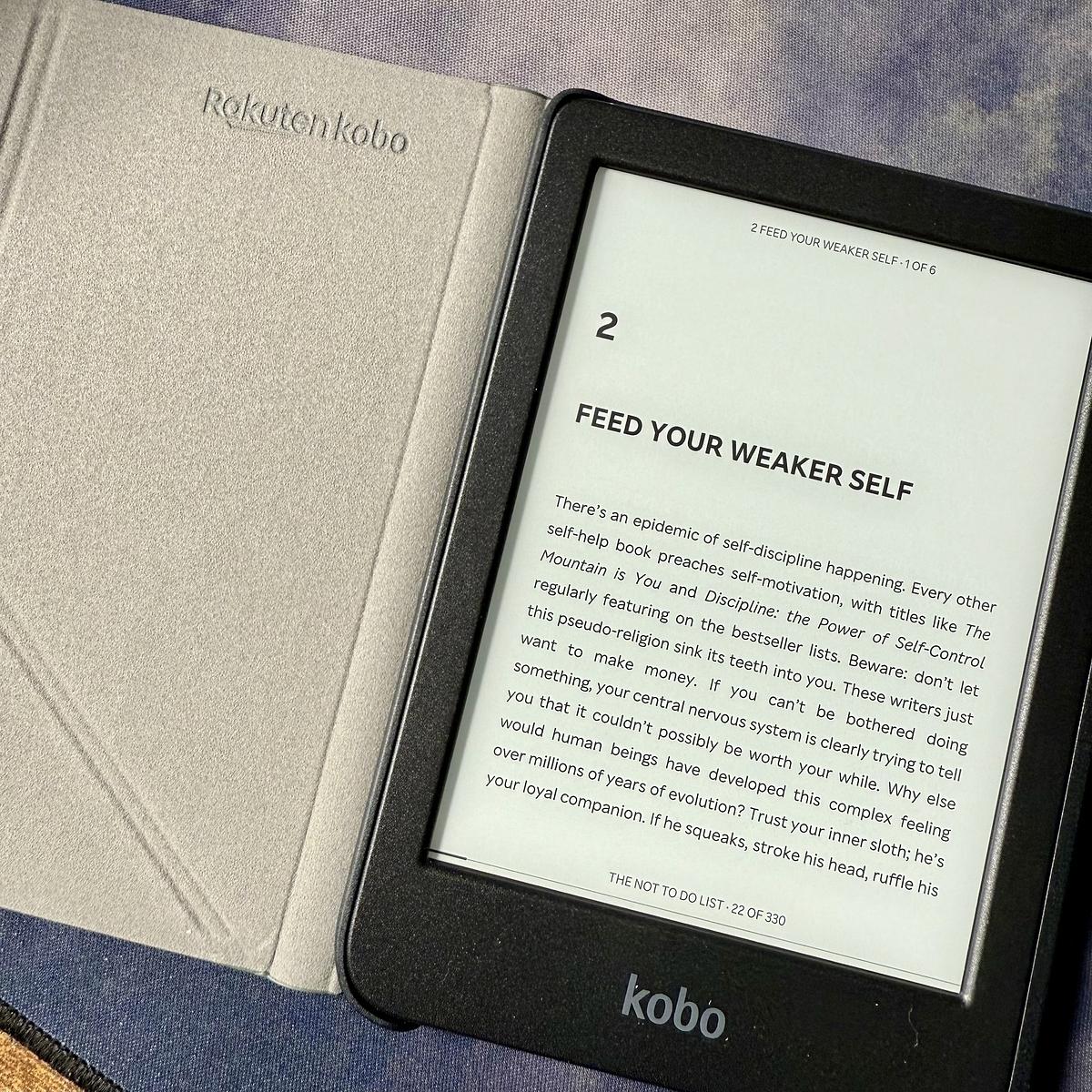
Father’s Day is just around the corner here but I managed to convince the family to let me have my gift early, a Kobo Clara BW e-reader. I’ve been wanting one of these for a while.

An open Kobo e-reader displays a page titled "Feed Your Weaker Self" beside its case.

Did earlier versions of the Unread app for macOS and iOS allow users to change the font? I’m sure I remember earlier versions of this app being able to do this, but I don’t see the setting anywhere.

I downloaded Glass after seeing it mentioned in my Micro.blog timeline. I like what I see so far, so I will give it a go over the next few weeks and see if it’s something I want to keep going long-term. I do enjoy taking pictures and posting them online.

Trying out TickTick

For the last weeks, I’ve been back to using bullet journaling. It works well, especially for my day job, for which I use a separate notebook. For everything else outside of work, though, it’s been working okay, but I feel I still need something digital-based for long-running projects.

Keeping a long list of tasks in a notebook is fine if you have one or two long-running projects, but I have a couple of web applications to keep track of and a growing project that now requires multiple lists.

I’ve tried almost every known task manager, and none of them has worked. Every task manager is different, so they usually don’t work out for me for various reasons. One task manager I haven’t tried though is TickTick.

First impressions are good. Tasks can be put into lists and even folders. They can also be tagged so that they can be filtered. A couple of extras I didn’t expect to see are the baked-in Pomodoro timer, an excellent addition to a task manager, and the ability to track habits.

It’s still early days, but it’s clear to me now that I need a digital task manager to keep track of these long-running projects. We’ll see how TickTick works out in the long term.

Congrats to the Pixelmator team on joining Apple! I’ve been using Pixelmator for years and have nothing but praise for its simplicity and design.

While this is excellent news for Pixelmator, I wonder how long Apple will allow Pixelmator to exist as it is.

I can’t decide whether Astropad’s Bookcase is a beneficial device or not. Yes, I’d like to read more, but not necessarily from my phone. That’s why I read from my Kindle. If you limit your device count to just the essentials, e.g., no Kindle, the Bookcase would be a good buy.

The new Reeder app probably isn't for me

Sadly, Reeder no longer supports other RSS feed clients like Feedbin and Feedly.

Why doesn’t this version of Reeder support third-party sync services?

With the new Reeder, tracking what you’ve read is based on your scroll position rather than traditional read/unread states. This design makes integration with most third-party sync services non-trivial, so support for these services is not currently planned.

— Reeder Help

This change away from unread/read states on posts is probably my biggest concern with the new Reeder app. Scroll positions have been used in similar applications to determine how much you read. From my memory, I didn’t use this feature in the applications that implemented it. I was happy to start scrolling from the latest posts and scan back as far as I wanted. It’s early days, though, and I haven’t even added any significant number of feeds to Reeder to see how effective this will work.

That is the beauty of unread/read states, though. Minimal thinking is required to determine what’s left to read. I know from a glance what I need to catch up on. Scroll positions require me to scroll to catch up to the point where there’s nothing left in my timeline to see. I would much rather click through collections of feeds and see precisely what’s left to read.

For now, though, I’ll keep Reeder Classic on my iPhone, but I can see myself using Feedbin’s iOS app instead of Reeder Classic over time. I imagine there will come a time when Reeder Classic won’t be supported. When that time comes, I would prefer to use an alternative to Reeder Classic daily rather than be forced to make the change away from it.

Is anyone a user of Hyper? I am looking for recommended plugins and themes. The Hyper homepage seems a bit sparse. I was hoping there might be more themes and plugins out there.

I like the new Journal feature by 37signals included in their Hey product. I’ll explore this for a few weeks as I’m also trying Apple’s Journal app instead of Day One.

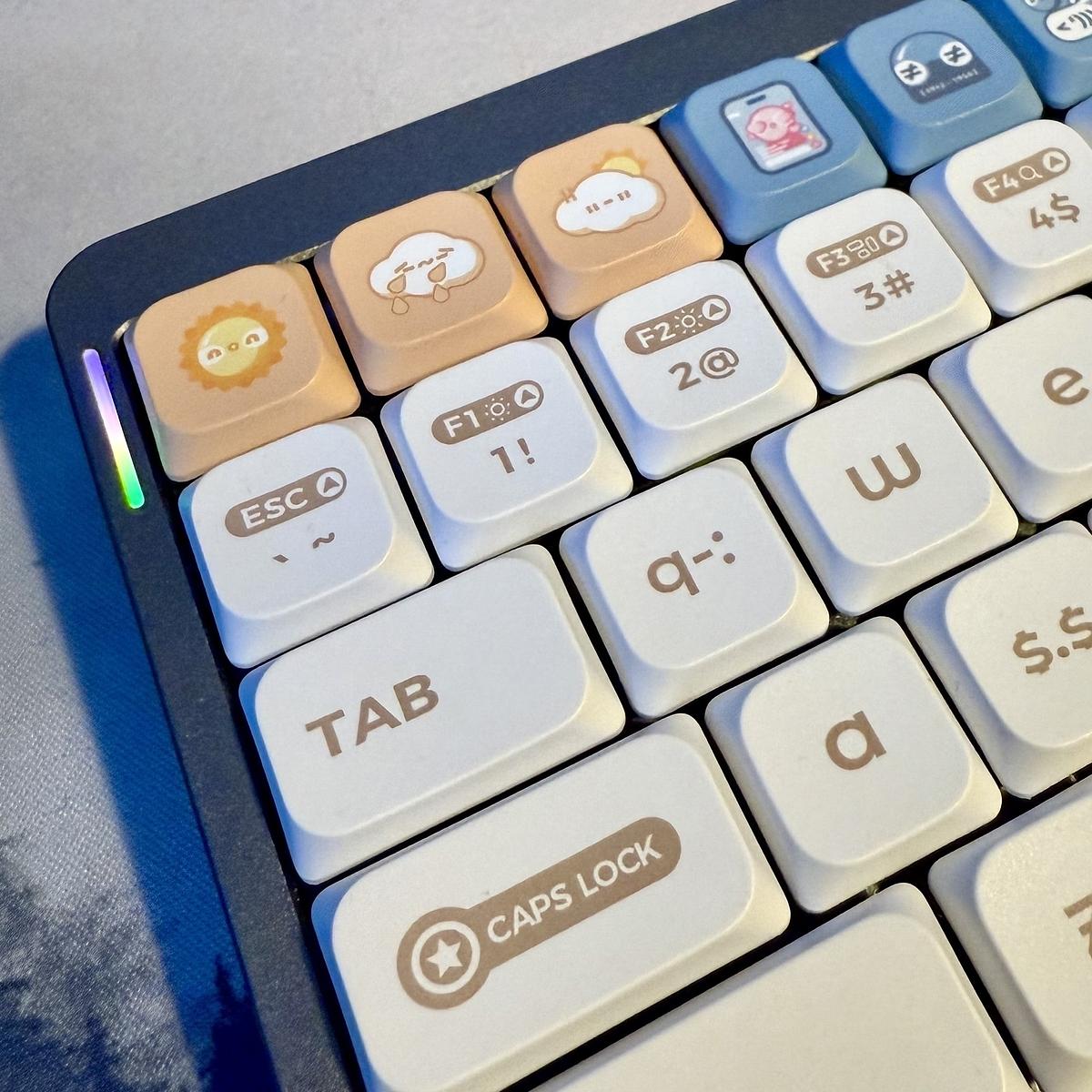
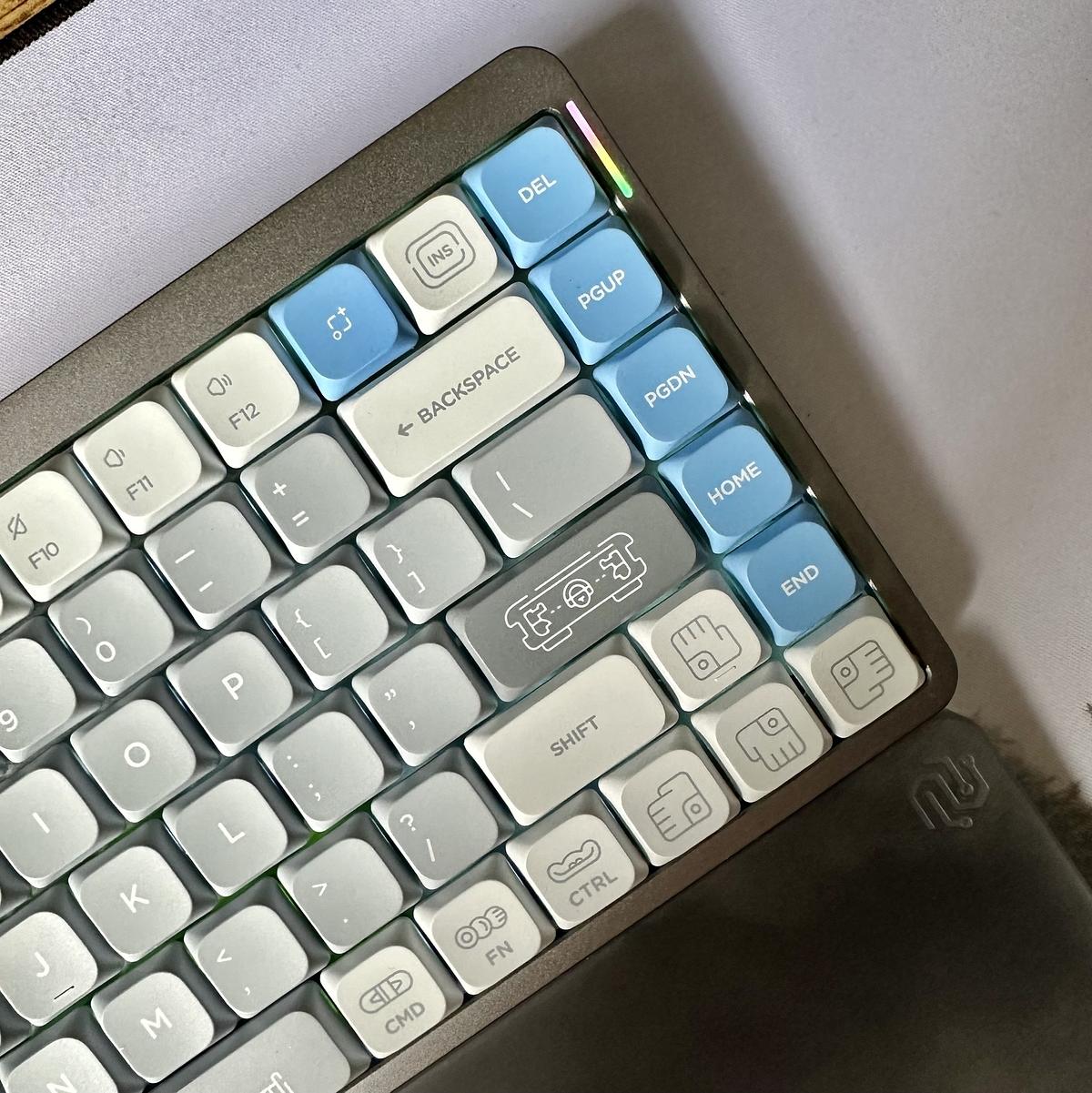
I switched out the default keycaps on my Nuphy Air75 for the Maya Imprint keycaps I ordered with the keyboard. Love this keyboard!

A mechanical keyboard with white, light gray, and blue keys, some of which have unique icons, is shown from an angled top view.

Second mechanical keyboard purchased

After hovering over the checkout button for months, I finally purchased a second mechanical keyboard. The Nuphy Air75 v2. Unlike my first KeyChron K6, the Nuphy is low-profile but still compact. It also allows for key remapping using VIA as well.

My KeyChron K6 was a good initial step into mechanical keyboards, but I feel I needed something more low-profile and more resistant switches. While typos are a thing for everyone, I made more typos on the K6 due to the switches I picked. While typing, I would frequently mis-hit keys, and it would register the keystroke as the switches didn’t require much force to travel and register the keystroke.

Also, I bought the K6 without trying other switches, so I knew I might eventually change my mind and buy something else. I’ll still keep the K6 and switch between it and the Nuphy. I’ll probably look into getting different switches and keycaps for it before the end of the year.

Loving my new Endor desk mat. That’s no coffee stain by the way, it’s a space station!

A computer mouse sitting on a desk mat.

Hats off to 37signals for making their latest Once product, Writebook, 100% free—well, at least for the initial version of the product. Sadly, there are no other export formats, such as PDF or ePub, but having the ability to publish books on the web is a good start.

If there’s one timeline I love scrolling through, it’s Elk, the Mastodon web client. A timeline focused on the centre of the screen with additional options to change its appearance and navigation. I love the Zen Mode toggle as well. Perfect for quickly zoning out the rest of the UI. ❤️

Feedbin has added a few new changes if you consume newsletters using Feedbin including customisable newsletter email addresses and a whole new domain for these email addresses. Nice!

The Airshow integration with Feedbin might just be the nudge I need to move from Overcast to Airshow. There’s nothing wrong with either app, but the ability to listen to podcasts in my feed reader might just be the game changer.

I’ve been giving Airshow a spin over the last couple of days, and I quite like it. I haven’t signed up for the remote sync yet, but I think I will, as it will sync up with my Feedbin account.

Sad to see that YNOT in Toronto is closing its doors.

I have several of their products, including two pairs of pedal straps (still going strong) and two backpacks. I’m disappointed I couldn’t pick up another backpack, but it’s good that they’ll continue selling the pedal straps.

I have my fingers crossed that 37 Signals release updated versions of their older products like Tada List and Backpack under their Once approach.

Still waiting to be added to the rollout of Hey’s new calendar app. It will be nice to have my email and calendar side by side.

I’ve read differing opinions on the Clicks for iPhone keyboard. I’m divided on the device. I can’t see it lasting long, given that iPhone sizes and shapes usually change. As a user of the Google G1 smartphone, though, I like the idea of a physical keyboard.

I think I would like to see more options available when composing posts in Micro.blog. As a default I would like the ability to always show the categories and the cross-posting options. Most of the time I’ll cross-post everything everywhere, but not always.

Stacking projects is a nice new feature in Basecamp. You can stack projects together much like you would bits of paper. They then expand out when you click the stack. Nice!

Hush - A new content-blocking extension for Safari on iOS and Mac.

Unlike some blockers, Hush has absolutely no access to your browser habits or passwords. Nor does it track behavior or collect crash reports - nothing leaves your device.

I’ve been giving the Bear notes app another try during the last few weeks. I’m not finding it has the same traction that I used to have with it. Also, the much-touted web interface seems to have fallen off the radar.

TextBuddy sounds quite interesting. It’s just a text editor for manipulating text.

A Swiss Army knife for plain text that is there when you need it and hidden when you don’t.

Cancelling my Fantastical family subscription this morning. The price increase for the family subscription from £62.99 to £99.99 is too big a jump for me.

Sticking with tried and tested

Over the weekend, I decided to give Readwise’s Reader application a spin. After seeing several tweets about the product, I thought it might be a way to combine my Instapaper and Feedbin subscriptions. After exploring the product over the weekend, I’ve decided to stick with Instapaper and Feedbin.

There’s nothing majorly wrong with Reader. It’s a fine read-it-later product and has many great features. It’s still in beta, though, but there’s nothing there that would stop others from seeing the value in it.

My main gripe with Reader is that it tries to do this and several other things, all in the same product. Saving articles for later is known, but it also allows you to subscribe to feeds and newsletters, send emails to Reader and upload PDFs and EPUBs. That’s a heck of a feature set, and while it can do all these things, I already have these features covered elsewhere.

My Kindle and Books apps handle any books that I might be reading. Instapaper is my go-to read-it-later service. Feedbin is what I use to subscribe to Youtube channels, RSS feeds, email newsletters and Twitter lists. Finally, between Hey and Basecamp, I have places for keeping emails.

The main difference I found is that while Reader does all these things, I am happier with the products I already use. That might be harsh comparing established products to Reader when it is still in beta. I did find Reader tricky to navigate through, and it just didn’t flow for me in the same way that Feedbin or Instapaper does. I’ve no doubt that Reader will improve over time, though I’m content with the setup I have now.

After the cancellation of Setapp, I’m reviewing several other subscriptions that could be for the chop. There’s no average monthly figure that I’m aiming for as a budget for these subscriptions, but reducing them over the next few weeks is the plan.

I cancelled my Setapp subscription today. I’m only using a handful of apps from this, and I know it would be cheaper for me to use alternatives.

Why I'm passing on renewing my Tweetbot subscription

It’s coming up for a year since I started my Tweetbot subscription, and now that it’s up for renewal, I’ve decided to pass on renewing it for the next 12 months.

Over the last year, I’ve been gradually finding myself using Twitter’s web interface a lot and their iOS app on my iPhone. The Twitter client has come under fire a lot over the years, but I find both their web interface and iOS app very easy on the eye, and they don’t present too much information at once. Also, now that I can change Twitter to see the latest tweets from my timeline, I no longer need a third-party app to do this for me.

I’ve also been using Tweetdeck on the odd occasion as another option. If I’m looking to follow my timeline and a couple of lists at the one time, I’ll use this. I have enabled the beta preview, which adds many new features.

While Twitter can be a time-sink, I’m gradually getting it to a place where I only check-in a few times during the day on my browser and use the app on my phone for a few minutes at night. I’ve also limited how long I can use Twitter every day, which lets me ration my time on it.

I use Twitter lists to break down who I am following into categories. Most of my lists are emailed to me using Mailbrew a few times a week. I do this so that I catch the highlights from each list every few days, and then I don’t need to check on that list until the next email. Mailbrew allows me to catch up on Twitter content within the safe confines of my email and has effectively become my offline client for Twitter.

Lastly, Twitter handles many things better for me than third-party apps like Tweetbot. I can bookmark tweets and see threads better as two minor examples, and there are probably more. For me, though, it means that another app subscription is perhaps something that I can do without.

I'm finally on the mechanical keyboard train

I’m typing this on my new Keychron K6 keyboard. It is a Christmas present from my wife, and I love using it.

This morning I decided to try and pair it up with my work laptop, a Windows laptop. It paired up beautifully. It even allows you to switch to a Windows/Android mode to make the key mappings better for those modifier keys on either side of the space bar. Now I can sit the one keyboard on my desk and switch my two laptops when I need to.

I have been looking at mechanical keyboards for a few years now, and while I have always considered getting one, I always put it off as I wasn’t sure what keyboard to get, what switches to select and what features would be supported. In the run-up to Christmas, though, my wife suggested that I make the jump and get one and call it a Christmas present from her. I did. And now, having used the keyboard every day for the last few weeks, there’s a thought running through my head.

I should have done this years ago.

How many times have you muttered those words? You realise that there’s a better way for you going forward, and you regret not doing it in the past.

You can end up quickly kicking yourself when you realise this. You end up looking back, wondering what would things be like now if you did that one thing years ago.

A change of your keyboard seems trivial, but it can happen with any change you make. You are cutting out caffeine at night, going for a walk every day, or reading a book at night instead of watching television. 

There’s another way of looking at this, though.

What if you never made the change to begin with, and you just kept plodding on, having never made the change?

At least now, having made the change, I know that I’ve made a change for the better. And it’s better to have made that change than never at all.

Tweetbot 6 is here

Tweetbot 6 is here with support for cards and polls, and a new subscription model of $0.99 per month or $5.99 per year. You don’t need to take out the subscription model, but it does limit what you can do.

The trade-off here is that you can take the subscription out for the app and get a chronological timeline with a few added features or use Twitter’s own app, which brings with it its own benefits and drawbacks.

After spending more time than I care to admit on Twitter’s own client, I’ve plumped for the annual subscription for Tweetbot 6. Over time I hope that we’ll get to see more features added to Tweetbot.

I’m not sure what to make of this Couch Console on Kickstarter.

I like having a reason to get up and get some nibbles or a drink, but this makes it much easier to sit and enjoy my movie, the American football, the golf or the lastest PlayStation game.

One thing I do know is that my boys would love one each!

HT to Tools & Toys for sharing this.

I had no idea Unsplash had an iOS app. Found out this morning after continuing my process of updating accounts with my new email address.

My Soundcore Life 2 headphones were a great buy. They produce good sound and have noise cancelling.

They also work nicely for online gaming, although I never thought about using them when I bought them. #mbaug

Hello Hey!

I’m sold on Hey email.

In the last six days that I have been using it, I’ve been getting my head around its features and workflows that make Hey different from most other email services.

The screener is a nice feature. When you receive an email from someone from the first time, Hey asks you if you want to continue to receive email from that person. Instead of you trying to determine if you have received an email from someone, Hey lets you know. Nice touch!

What I like best about Hey though is that it doesn’t look or act like a typical email client. There are some similarities sure, but instead of going down the same route as every other email client and using the same view for each collection of email, Hey goes a step further to make different groups of email more comfortable to read. The Paper Trail allows to scan recently received receipts, but The Feed page shows recently received newsletters and also makes them easy to browse through much like you might scroll through RSS feeds.

One advantage I’ve found from signing up to Hey is that I can stop using an email address tied to my domain name. Sure, it’s nice to own your domain name as well as use it for your email address, but I often wondered if tying these two together was a bit of a hindrance. Over the years my email address has been used for all manner of accounts and is probably on quite a few mailing lists that I would rather it wasn’t on.

In signing up for a Hey email address, it felt like I had a clean slate to start over with again. When Hey adds the ability to use custom domains, I might not transfer over my domain right away. I think I’ll keep going with Hey’s email address for as long as I can.

I’m going to pull the trigger on the subscription tomorrow at some point. Sure, it’s early days for Hey, and there are lots of things that are missing, but for a product in its first few weeks of launch, it’s got more than enough new features to make me switch over.

After some consideration, I’ve decided to kill my Atlassian account. I’m not using any of their products other than Trello. Despite Trello’s benefits though, it can be replaced by a number of tools that I already own.

A brand new editor is coming to the Bear app and it is available now if you want early access to it. Tables would be a welcome addition to my notes, but I think I’d rather wait for the official release though. I’d rather not risk screwing up my notes.

It’s great to see Feedbin have added an automatic option that will automatically switch between light and dark. What is really great though, is the per device settings. Finally I can use different settings on my iPhone that won’t change the settings on the desktop.

In the search for a viable alternative to Fantastical, I’ve found that Calendar 366 has a pretty good like for like match to Fantastical’s features and without the subscription. I think this will serve as a good replacement in the short term.

Looking more into app subscriptions and Fantastical alternatives

There was much debate this week about Fantastical’s move to a subscription app and subscriptions in general. Now, I’m not against developer’s adding subscriptions to their apps, they have to make a living somehow from the software that they produce.

My concern with Fantastical is the price. I find the subscription price quite high in terms of how much I use the app and what Fantastical are offering in their premium subscription.

Is Fantastical worth it?

Just as a comparison, I decided to look at the apps on my home screen and their subscription amounts. In total, I have 12 apps on my first home screen. Given these are the apps that I use daily, then it’s apparent that I do place a lot of value on these I have subscriptions for apps on other screens, but these are used less regularly.

Here are the apps that I pay an annual subscription for that are on this first home screen:

  • Micro.blog ($50)
  • 1Password (~$60)
  • Todoist ($35.99)
  • Bear ($14.99)
  • Day One ($31.99)
  • Feedbin ($24.99)
  • Instapaper ($29.99)

Now taking these annual subscriptions into account, there is one that I can’t do without and that’s 1Password. Being able to save my logins securely and across multiple devices is such a time-saver. I’m not saying that price isn’t an issue on this one, but this app is essential.

The rest of the apps that I pay annual subscriptions for aren’t essential, but I do use them daily and usually on multiple devices. There, I do find them valuable. At the top end of the scale in terms of price are Micro.blog, Todoist, Day One, Instapaper and Feedbin. At the bottom end of the scale is Bear.

If I were to pay for Fantastical’s pricing, it would put it at the top end of the subscriptions that I have. It’s not going to break the bank, but I do find it a bit steep. And that’s why I’m not 100% convinced that Fantastical’s new subscription app is for me. Despite using Fantastical most days to manage my schedule, I would not consider it to be worth its subscription price.

It isn’t straightforward to compare apps and their usefulness as there are used differently by everyone. For example, I use Bear and Feedbin daily, and I find them both very useful, but over the year the price difference in the annual subscription is $10. It doesn’t sound like a lot, but when you consider that you might have other app subscriptions, they can quickly rack up. So while I accept that it’s hard to compare apps and their subscriptions, I still think that the price for the Fantastical subscription is quite high.

The Fantastical alternatives

Right, so we’ve established that I find the Fantastical price a bit high, so what are the alternatives?

As for alternatives, I tried Apple’s own Calendar app this week and found it sadly lacking in features. I didn’t expect a whole lot from the app as I know it’s free, but it doesn’t appear to have been updated very often.

There are other calendar apps on the App Store, but some that I have seen are free and have ads in them. You then have to pay to remove the ads. This style of pricing isn’t necessarily a bad thing in a calendar app or any app for that matter, but I’m personally not a fan of this style of pricing. I would instead prefer developers to charge a price for their apps or be free with an option to unlock features with a reasonably-priced subscription. For me, ads have no places in apps, so anything that has ads is out.

I also gave Calendars 5 a try from the app store. Sticking to the pricing argument I made earlier, I bought the app for full-price, which is $6.99. It does everything that a calendar app should do. Natural language input, different views and light and dark themes are all there. You can sync your iCloud calendars across multiple devices, and there’s an iPad version of the app too. I didn’t install this though, as I find that having a calendar app on my phone and my desktop is enough for me.

I’m also giving Timepage a run again, but the lack of calendar views does limit it a bit, and there is no equivalent app for macOS. There are however a number of things going for it that I do like. It includes weather forecasts for events, travel times and a daily briefing notification to see what’s coming up for the day. It’s also very customisable and includes several options to adjust the app including themes, font size calendar and timeline. It’s also significantly cheaper than Fantastical at just $11.99.

Making a decision

Having tried these apps out this week, I’m going to ditch Calendars 5. It’s okay as a scheduling app. However, I do like the extra effort that has gone into the user interfaces of both Fantastical and Timepage.

I’m still torn between Timepage and Fantastical though. Fantastical’s calendar group syncing is a feature I would like to have, but it’s not essential. To be able to have calendar groups sync between phones would be great, but it’s not a deal-breaker and certainly not worth the price of the app subscription as it stands at the moment. It’s more of a nice to have.

I haven’t deleted Fantastical from my phone yet. I can still use it without the annual subscription, but I know I’m going to get frustrated with the number of features that are locked out. It’s at this point where I will either cave and go for the subscription or I will delete the app. Fantastical hasn’t been too aggressive in reminding me to upgrade. Still, it feels like over time I might be nagged into upgrading.

There’s also the question of changing my subscription. If I take the Timepage subscription now, I could still change my mind and then use Fantastical. However, it will always feel like I wasted some money on a subscription that I’m not going to use. Sure, I bought the Calendars 5 app, I’m prepared to do that to find the right app to use. What I don’t want to do though is take a subscription for an app that I won’t fully use.

I can see me sticking with Fantastical in the short term. It will be interesting to see if Flexibits make any changes in the short-term based on user feedback of the jump from 2.0 to 3.0. Still, I suspect that they will leave the app subscription price as is. Most users will come round to paying the subscription. For me, though, it’s still too high a price to pay at the moment.

A simple upgrade has turned into a multi-app deep dig of calendar apps over the last few days as I tinker with Fantastical 3.0, Timepage and Calendars 5. I think I might rule out Calendars 5. It doesn’t offer the same benefits that Timepage has. Which just leaves me two apps now.

Fantastical 3 alternatives

Following on my Fantastical 3 post, I’m considering moving to Calendar for iOS as it’s free and does the job. You might also want to consider Timepage, the calendar app by Moleskine. Like Fantastical 3, it’s a subscription app, but it’s much cheaper than Fantastical. I haven’t done a like for like comparison yet, but I do remember it also includes weather and travel times.

I’m not back to work until the 6th of January but I’ve got some marketing work to do tomorrow for my side product. Not my favourite aspect of building a product but an absolute necessity in this case.

NYT subscription

I’ve been toying with the idea of taking a New York Times subscription. I find myself on their website quite a lot, so I thought it would be worth removing the limit on the number of free articles that I can read.

At £10 per month though, I’m not sure it’s something that I really need. There’s also the annual subscription that I can find through their iOS app but not on the website. If I take this, then I find myself taking a bigger initial hit of £99, but I end up saving over the 12 months.

I think what’s putting me off is the fact that the monthly subscription is double digits. It’s £10. I usually don’t hesitate are subscribing to services under the £10 mark as they are only a few quid for the first few months and then I can decide if it’s worth the cost.

The New York Times subscription though starts above that single-digit level. And that’s got me thinking that I would rather not have it at all, instead of giving it a try for a few months.

I get why subscriptions are great for journalists and news sites. I’d rather pay a subscription for a high-quality source of news and be able to read it while not being hit with adverts everywhere, but I find both the monthly and annual options just a little bit too high.

After today’s news that Google has bought Fitbit, I’ve decided to delete my Fitbit account. This wasn’t a knee-jerk decision based on Google’s ever-increasing grasp of the world’s data, though.

For a few months, my Fitbit Alta hasn’t seen the light of day due to abysmal battery performance. I was lucky if I could get it to last 24 hours. I have been looking at a replacement Fitbit for a few months, but nothing really stood out as being a worthy replacement. Today’s news that Fitbit have being acquired by Google was just the last nudge I needed towards looking elsewhere.

I’ve been curious about an Apple Watch for some time, but I haven’t quite found the need to buy one. I must admit, I do prefer the idea of just having a watch, but there’s something about the Apple Watch now that has started to grow on me.

One last thing. It seems that no matter what size of company you are, there’s always going to be a more prominent company that will eventually buy you out. It puts me off thinking that I can get behind a company who has an innovative new product. It’s a good chance that eventually they will end up being swallowed up by someone else.

I had no idea that Basecamp offered a free plan for smaller teams and individuals. Is this a recent change in their product or have they always had this?

I’m starting to wonder if running a side product is worth the hassle, given the amount of regulation on privacy and payment processing there is now.

The pebbles of product work

I like this.

Each piece of work is a mere pebble tossed into a flowing river. Maybe your pebble will become bedrock—sticking around for a long time and altering the water’s trajectory. Or, maybe it’ll quickly dissolve into dust when new pebbles come along and crash into it. Both of those outcomes are completely natural and worthy of celebration.

— Nobody really owns product work

Having worked on several different products, I can attest to the highs and lows of seeing your ideas implemented but ultimately replaced over time. The hard truth is that as soon as you commit your work to the product and it’s released, it becomes the target of scrutinisation by both the product team and the people that use the product.

Ultimately your work will be replaced over time, but it’s all towards the greater good of learning what’s best for the product and for those that use it.

Great advice for those building new products.

At both Viaweb and YC, every minute I spent thinking about competitors was, in retrospect, a minute wasted.

Paul Graham

Killed by Google is a reminder that although the Google search engine has been around for over 20 years, many of Google’s products have a much shorter life span. Google’s products are more akin to long term product tests than actual products.

I’m getting good feedback on an idea for a new service and product.

The next step is to create a website and engage with a wider audience for the service and see what the feedback is from the market using a combination of content on the website and social media.

WhenWorks

WhenWorks is a new appoinments app that allows you to define when people can book appointments with you.

Setup is a breeze. Just install the app on your iPhone to create your free WhenWorks account, and you’ll immediately have a web page where guests can book appointments with you online.

— WhenWorks

Love the fact that it simplifies what was a somewhat tricky process to begin with. Scheduling meetings an appointments can be a pain.

WhenWorks is available from the app store.

I’ve started compiling lists of bookmarks that I use almost daily. By putting them in Bear, I’m hoping to have them more readily available than trying to find them in Pocket. Also, Bear allows me to add a bit of context to each bookmark.

I remember a similar app for iOS that did something similar to Edit. As good as Bear and Ulysses are, sometimes you just need a place to write without the bells and whistles.

The never-ending cycle of trying out apps and what I am doing about it

Everytime I try a new app or service out, it feels like I’m simply putting something else on my radar that I need to check.

A couple of weeks ago I installed an app to remind me to keep moving through the day and keep my water intake going. I deleted it this moring in favour of simply adding a few events to my calendar with reminders. Stupidly simple I know, so why didn’t I think of doing this first before wasting my time with another app?

There’s a flurry of apps that focus on one thing and do that thing really well, but the problem with this is that I end up needing an handful of apps each geared towards their own way of meeting my requirements. These single responsibility apps might be good at what they do, but they suck at everything else.

I’ve got a core set of apps that I use daily. These apps can be adapted to handle most of the things that these single responsbility apps do. They might not do them as well or with less eye-candy, but the result is often still the same.

My core apps at the moment are the following:

  • Bear - For notes and capturing
  • Fantastical - For time management and reminders
  • Pocket - For long-term bookmarking and reading list
  • Trello - Project management for client work

I should learn to use my core apps for everything I do now and adapt them to what I need them to in the future before installing another app to try out.

Migrating Day One to Bear

This week I’ve started migrating my Day One entries to Bear. I initially wanted to omit all the tags for my Day One entries on the import, but I decided to leave them in. The reason for this is that although Bear uses these tags and will populate the sidebar with them, it will be much easier for me to migrate entries for each tag into Bear correctly.

I’m using a top-level tag of #journal for all my entries. Within this top-level tag, there will be some nested tags.

  • Entries are tagged with the month and year. All tags in June of 2017 will have the tag #journal/2017/06.
  • Special moments get their tag of #journal/moments.
  • Other tags will be used as #journal/drew and #journal/ethan.

With all the extra Day One tags now listed in my sidebar, I’ve now started the task of migrating these entries to use my new tagging system for my journal entries. I’m taking it a couple of tags at a time, and I’m already roughly a quarter of the way to migrating all these entries over.

It looks like a particular way of tagging these entries, but in the long run, it will be much easier to find everything as well as exporting a month or even a year of entries to another format so that I reproduce them in a better form.

I'm ditching Day One

For the last few years, I’ve been using Day One as a digital journal. However, over the previous few months, I’ve been using it less and less. To the point really where I want to stop using it altogether.

Too much meta

The thing about Day One is that while it is a great journaling app, I’ve noticed that I am becoming more and more distracted with the meta-data for each post. Weather, tags, location, starred. It’s all just a little bit too much.

All I want to do write an entry, attach a picture or two and then move on. Day One does let you do this but it’s the meta-data that I find to be too distracting.

The alternatives

Bear is a great note-taking app. I love it.

I use it for many different things, but the one thing that I would like to do is use it more as a digital journal.

I’ve tried to do this before however, I ended up importing all of Day One’s tags when I did this, so I ended up with more tags than I needed. This time I hope to opt out of importing the tags (or try and remove them before the import) and then start from there.

Sunlit is also on the cards as a digital journal, but I would use this for day trips, weekends away and holidays. I’ll be honest and say that I haven’t tried this yet with Sunlit so it might not meet my expectations.

We’ll see over the next few weeks as I gradually move my journal entries out from Day One.

I’m considering a set of wireless headphones for client calls and blocking out the kids whiles I’m working. Recommendations?

So following the footsteps of TextExpander and Day One, the writing app Ulysses is now moving towards a subscription service.

I’ve wrote in the past about subscription services. I get why people and companies are doing it. Subscriptions provide a more stable revenue stream and allow consistent development of the product.

If I was a keen writer and I used Ulysses on a daily basis then I imagine that I would take out the Ulysses subscription. For just under $5 a month I’m getting a great writing tool that I can use on all my devices.

$5 isn’t a lot of money, but when you’re working on the Internet on a daily basis, it won’t be the only subscription service you’ll have. You’ll have other subscriptions for other products and services that you use and these all add up. With all these subscriptions, they can quickly mount up.

I used TextExpander for a few years until they announced that they would be moving to a subscription plan for their users. Many seen as it as a good move for TextExpander to support the business and I agree with that. What I don’t agree with though is the pricing. Paid monthly, TextExpander is only 83 cents cheaper than Ulysses. Two vastly different products, but very similar in pricing. Are they priced right? Who knows. All I know is that I refuse to pay a monthly subscription service for a product that I only use on a single device.

I’ll be interested to hear what Curtis has to say on this. I know he’s been a long time user of Ulysses but we emailed each other recently and he did say he was cutting back on subscriptions. Will he cut back on this? I’d like to say he’ll stump out for the subscription, but I’m not entirely convinced.

Lastly I also just remembered that Ulysses is available on SetApp. It will be interesting to see if Ulysses remains on Setapp as it only costs $9.99 per month and for that you get access to an increasing number of apps for OS X as well as Ulysses.


Update 2017-08-10: It looks like SetApp user’s don’t need to worry as Ulysses will be unlocked on your other iOS devices if you have already picked Ulysses using SetApp. Good to know!

In addition to those “big” arguments from above, there are bunch of smaller advantages, too. One example: if you use Ulysses via the Setapp subscription, we will now automatically unlock the iOS app as well. And the way we modeled and priced our subscription plans, now much closer resembles the value each plan provides, than a “pay once” model ever could.

— Why we’re switching Ulysses to Subscription by Max Seelemann

Subscription pricing for Day One

Day One’s change to subscription pricing model is taking some flak but I think it’s a good move for them and ensures that it will be around for a long time to come.

Subscription pricing isn’t new to apps, but it’s on the rise and this is largely in part because upgrade prices alone for apps are not sustainable.

A great example of app pricing in my book is the Todoist app. While the Todoist app itself is free, they also have a premium subscription which really adds value what you get from using Todoist. It’s subscription models like this that are the way forward. Paying for the software you use on a regular basis. In a lot of cases the pricing is very reasonable and I certainly wouldn’t argue over paying between $20 and $50 per year for software that I value and use on a daily basis.

David Sparks rounds up the changing landscape of app pricing nicely.

The traditional model for productivity apps was the upgrade price, where developers released a new version every year or so and everyone paid a reduced fee upgrade price. I know the App Store has made improvements over the last few years but, having zero inside knowledge, I can’t help but feel we will never see upgrade pricing in the App Store. In the meantime expect more quality apps to go to the subscription model and, if they are apps you love (or even like), I’d encourage you to support them through the transition.

— Productivity Apps and Subscription Pricing by David Sparks

Fall like a thunderbolt

I have never read The Art of War, but I’ve seen this quote enough times mentioned elsewhere (other books, games and of course the Internet) to know that it comes from Sun Tzu’s book on military strategy and tactics.

Let your plans be dark and impenetrable as night, and when you move, fall like a thunderbolt.

— Sun Tzu, The Art of War

I recently spotted this quote during a gaming session on Call of Duty: Modern Warfare Remastered. In between scenes a quote from history appears on the screen.

It got me thinking about the trend towards crowdfunding for products and how transparency is often thought of as a good thing when it comes to building products.

With the recent surge of crowdfunding, you might think that you have to have an idea to tell the world first before it can be successful. It’s not always been this way though.

Before Kickstarter, before crowdfunding, before the Internet successful products were built without customers knowing too much about the products until after there were launched.

I wonder if in the light of all this crowdfunding that it’s time to consider working on products in a new way? Building the product under the cover of darkness, without the world knowing. Then when it’s ready, deliver it to the world. Letting it fall like a thunderbolt.

We live in an age where everything we do is shareable and only a click of way from others knowing what we’re doing. It not only applies to what we do in our own time, but also what we do when we’re working and that include what we work on.

In some cases it’s a good idea to get crowdfunding for a product. You can test the market and get the financial backing before the big push.

Perhaps we might want to consider the opposite as well. If we spent our time working on something without anyone knowing about it, could we capitalise on it and thereby surprise people’s expectations?

Evernote - Time to move on?

So apparently Evernote employees now have the ability to read the notes in your Evernote account. There is an opt-out feature in the settings but I wonder how many people will do this?

I started using Evernote when it first came out. Since then I’ve closed and re-opened my account a number of times. To me Evernote feels bulky and awkward. I’ve tried to use it a number of times, but each time I find the product too difficult to use. I last tried Evernote just over a year ago. I went for a couple of days before I closed my account again.

Evernote started it’s life well as a product but in recent years it has taken a lot of criticism for it’s usability, support, pricing and now it’s stance on privacy. With the growing criticism you have to wonder if there’s life left in the Evernote product and whether it will stand the test of time.

It’s starting to look like Evernote has lost its lustre, which is a shame. I know a few people that use it daily to help them run their business.

If I was still an Evernote user today then I would be considering looking at alternatives. I use Simplenote myself for notes and there’s also Bear which was named one of Apple’s best apps of the year in their App Store.

Whether you’re an Evernote user or not, you always have to consider the lifetime of the products you use. It’s a small percentage of products that stand the test of time and maintain their status as a wonderful product.

For everything else you have to ensure that if your product of choice folds, you can take your data elsewhere with minimum fuss.

Timepage 2.0 Update

My favourite calendar app, Timepage, has just been released with a number of particularly nice features.

Theme colours

The themes preferences screen gets an overhaul that allows better manipulation of the theme as well as new colours and the ability to use light or dark text for your theme.

Advanced Repeating Events

Events can now be repeated with greater granularity. One example of this is you can set an event to repeat on a particular day and week of the month and repeat it a number of times.

Better Notes

Notes now support URLs, flight numbers, email addresses and phone numbers.

There’s a also a number of other features and improvements like synchronisation between devices, text size and calendar colours.

What sets Timepage apart from other calendar apps for me is the user-interface. It’s not like your typical calendar app. Almost all calendar apps start from a month view and work down to a daily view.

Timepage is different in that it starts with a view the upcoming days and allows you to switch to a heat map of the month or a view of your day.

The iPhone and iPad applications both share the same look and feel but with the extra screen space on the iPad you get a split screen view of the upcoming days and what’s happening today.

There’s also nice integration with Dark Sky for weather updates on both the iPhone and iPad versions.

All I need now is a version of this app for my macOS and the set of Timepage apps will be complete.

Otterbox Chargers and Headphones

My favourite mobile phone case company Otterbox are now expanding their product line to include chargers and headphones.

I’m pretty much tied to my Apple EarPods (not the wireless ones, they look ridiculous) as they serve my needs. I also have a reliable Anker charger that I use when I’m out and about.

I’m intrigued by the products that Otterbox are now offering but it will take a few good solid reviews to make me part with my cash.

Took advantage of the @ynotmade sale and put an order in for a Laneway backpack. My Gulper is great but too big for off-the-bike use.

Tempted to back this laptop stand that adjusts in height.

Currently I have a Griffin laptop stand that sits at a significant distance below my preferred eye level. While my laptop screen isn’t my main screen I do switch between it and my larger screen through the day.

My First Wearable - The Fitbit Alta

A few weeks ago my wife bought a Fitbit Alta. She’s been on a health kick for the last couple of months and she wanted an easier way of tracking factors that were contributing to her progress. Simple things like number of steps in a day, calories burned and the amount of time she spent being active are all little things that can help. After reviewing a few different health trackers she eventually decided on the Fitbit Alta. A couple of weeks later and she was regularly meeting her steps goals and seeing general health and fitness improvements.

It was a couple of days later and I my own Fitbit Alta arrived from Amazon. Having already setup Jennifer’s Alta, setting up my own was a two minute job and within a few minutes it was tracking my step count.

Like many health trackers, the Alta looks like a ultra-modern watch and yes it does give you the time. I don’t tend to wear a watch during the day and only opt to wear a watch when I’m going out. At times like this I’ll move the Alta over to my other wrist and wear it there for the time I’m out.

The tracker itself is fairly narrow and with the screen being more longer than it is wider, you’d probably miss it if you seen it on my wrist. The slender design is one of the reasons why I liked this particular model. Too many health trackers try and replace your watch with a huge screen but I’m not using it for telling the time or keeping an eye on my running distance. It’s purely to track my movement over the course of the day.

After three weeks of use I’m starting to see the benefits and drawbacks of health trackers.

The Benefits

On the plus side there’s the ability to see how well you’ve done over the course of the day. Number of steps, walking distance and number of minutes I’ve been active for are three factors I try to keep on top of. Anything else is a bonus. You don’t realise how much walking you done when you look back at your day. I never considered walking Ethan round the golf course to be much of an exercise, but the tracker picks up the activity and works out how many steps I’ve taken.

I took the Alta out on a bike ride to our favourite deli. The tracker worked well and could workout that I was on the bike. Comparing the time spent on the bike with the time logged by Strava (which I also use for tracking bike rides) proved to be consistent.

The Drawbacks

The downside of the health tracker is the accuracy of such a device. Like any technology fan, I’ll take their promise as being accurate with a pinch of salt. I mean, how accurate is it?

I did do some research on the accuracy of health trackers, and there has been some debate of the accuracy of health trackers. While I know there is always going to be cases where steps were missing or added, the health trackers today do a good job of tracking your movements.

I’m not completely sold on the calories tracker within the app. I do a lot of home cooking and portions and ingredients can vary from those foods listed in the Fitbit app. For that reason I tend to ignore this part of the app.

My own cooking is fairly healthy so I don’t see that as being a big issue in the march to better health.

Room for Improvement?

With such a small screen on your hand you would think that it’s hard to read incoming messages on your phone. Well it does only display the first few words from your message, but that’s not a deal-breaker. The display is good and the information that you display on it is adjustable from your phone. I would like to see more customisation though on the information that I can display.

The one feature of the tracker I’m disappointed in was the reminder to move setting. During each hour you set the Alta up to track your movements, it reminds you 10 minutes before the end of the hour to fulfil your hourly quota of steps. Seems a little silly to remind you 10 minutes before the end of each hour.

When I read about this feature I thought it would allow you to configure the Alta to notify you at set intervals to get up and move about. Having just completed a running course of physio to get my back into shape again, the physiotherapist reminded me that I shouldn’t be sitting for any longer than 15 minutes at a time. I thought the Alta’s reminder to move would be configurable to do this but sadly it isn’t.

Overall the purchase of the Alta has been a good thing. I’m more aware of the amount of sleep and exercise I’m getting. I’m also cutting myself a bit of slack as I now know that I’m getting exercise in just by getting a few walks in during the week. Whether that’s walking Ethan to school or round the gold course, all the steps add up.

It’s taken me a while to warm up to purchasing a wearable but the good thing about it is that I’m getting a clearer sense of the exercise I’m doing. As long as I’m getting in a daily dose of exercise then that can’t be a bad thing.

Saying Goodbye to Evernote

Ian Dick writes about his farewell to Evernote.

This year though a couple of things changed. Firstly Evernote tweaked there prices so I’d be paying more going forward. Secondly, Apple Notes improved and also offered a way to import Evernote content as did Microsofts Onenote. There also seemed to be a lot of grumbles in the many podcasts I listen to about what Evernote had become and how viable was it’s future.

— So Long Evernote

Evernote’s proprietary format has been a reason why I don’t Evernote. It’s easy to get stuff in but hard to get it back out. I tried Apple Notes for a while but it’s Simplenote that gets my award for best notes app.

The notes app Vesper has closed down. I wasn’t a user of Vesper but I did give it a try just over a year ago.

I’m never happy to see a product close down that the people behind it have invested in and love using, but there’s a lesson here that many people ignore.

You need revenue.

John Gruber’s analysis of what went wrong is simple and a lesson for anyone thinking that pricing a product is just a matter of slapping a price on it.

What went wrong was very simple. We never made enough money. Why we didn’t make enough money, what we should have done differently to make more money — those are complex questions (which I’ll tackle below). But what actually sunk Vesper was not complicated. Even as a relatively popular app at a relatively high price (for iOS), revenue was never high enough.

— Vesper, Adieu by John Gruber

Sad to see Vesper go, but hat tip to John for providing such a detailed breakdown of what went wrong and what the Vesper team should have done to generate revenue for the app. This is required reading for anyone getting in the apps game with an idea of their own.

Is Your Product Easy to Duplicate?

For many software developers, rolling your own version of a product is a tempting thing to do. You might want to add your own feature to the product or you might think that having more control over your data is important.

I recently questioned the value of FormKeep, a product that I was using. FormKeep allows you to create forms for any website and persist the information from the form without the need for your own database.

This isn’t a problem for a CMS like Wordpress as it already uses a database for persisting data. In the last few years though static websites have become popular. The simple action of generating the website for each change makes them ideal for people that have websites that require little maintenance. There is one drawback though. With the website being static, it can’t process information and store it anywhere. Static websites are a collection of files served by a web server with no backend database. So how do you add a form to your website?

For a while there’s been a number of products that allow you to embed a contact form in any page on your website, but the problem with this is that the embedded form is typically different in terms of style to the rest of your website and it can look out of place.

FormKeep does away with this drawback by providing just the endpoint that a form will submit too. The obvious benefit is that your form will still share the same look and feel as the rest of your website. Given the popularity of static websites, FormKeep definitely fills a need.

The trouble with FormKeep though is that while I do have a number of contact forms on different websites, there was always a niggle at the back of my mind that I was paying significantly more for a product that I could build on my own.

I’ve tried this in the past with a number of products and it doesn’t always work out. I created my own bookmarking site that included many of the feature that Pinboard offers, but there was still a number of features that I didn’t build. For the money though, it’s hard to argue with Pinboard’s pricing. $11 per year for hosting your bookmarks with a further $25 per year to keep copies of the original URL for each bookmark in your account. I could blow through twice that in a year for similar hosting on Heroku. Eventually I learned my lesson and gave up. I re-opened my Pinboard account the following day.

Building my own FormKeep was simpler than building my own Pinboard though. All I needed was an endpoint that accepted form parameters and saved them to a database. I set aside a few hours one day and quickly had my own version of FormKeep up and running. It’s running on Heroku at a cost of $7 per month. Compare that to FormKeep’s $29 per month and already there’s a significant saving. I might not have the clean UI that FormKeep has but the UI I have works for me.

In this case rolling my own solution worked to my advantage. I still have the same functionality that I had in the past with FormKeep and I’ve made a significant reduction in my expenses for the year now with my own solution now requiring just $7 per month.

Rolling your own solution doesn’t always work. Products might have years of features behind them that you just can’t replicate with a few hours of work. Sure you could have the most important feature up and running but what else needs to be added before you can safely say that your own solution will fit all your needs?

In the case of FormKeep it’s still a fairly small product and can be duplicated. And that’s where I think products need to be wary.

I was a long time user of FormKeep and in that time it’s feature set didn’t change much. Don’t get me wrong though, FormKeep definitely is valuable to people that don’t have the knowledge to run their own endpoint for capturing forms. For a user like myself though, FormKeep doesn’t offer anything that can’t be duplicated in a few hours of coding and that’s something you should consider if your building your own product.

If your product has a small feature-set that can be easily duplicated in a few hours then is it providing value?

Props to the @highrise support team who replied to my support query this morning. Great product and great customer service.

The one feature I wanted to see in Twitter’s Mac client and it’s not there. Back to Tweetbot it is then.

Goodbye Carousel and Mailbox

Dropbox has decided to call it a day on their photo management app Carousel and the email client Mailbox.

Building new products is about learning as much as it’s about making. It’s also about tough choices. Over the past few months, we’ve increased our team’s focus on collaboration and simplifying the way people work together. In light of that, we’ve made the difficult decision to shut down Carousel and Mailbox.

— Saying goodbye to Carousel and Mailbox by Dropbox

To be honest this isn’t going to have any impact on me. I didn’t use either of these services, but what’s interesting is that we’re losing another good email client to a tech giant. I didn’t use Mailbox myself but it’s clear from the many messages and comments that lots of people used and they rated it very highly.

I remember using Sparrow for a few months as my email client before they were acquired by Google. I loved using it but upon the news that it was being acquired I quickly switched back to using my previous email client.

It’s unfortunate that great software applications are acquired and then disbanded or boxed away inside the tech giants. I can’t comment on the companies and individuals that are acquired in this way though. I would find it hard to say no to any sizeable amount of money for a software product that I owned.

Am I missing something? Dropbox closes down Mailbox. Tweets from people that they have no great email client now. Mail app not good enough?

Brief assessment from using Tweetbot 4 for the last few days: Nice features but for me the official Twitter client is still my favourite.

Dammit. Bought Reeder 2 on the MAS then found out today that Reeder 3 is in beta and includes Instapaper.

I recently read Kurt Harden’s list of products he hasn’t regretted owning. I decided to carry on this theme with my own list off products that I have no regrets of owning.

Amazon Kindle - I bought Amazon’s Kindle 3G model when it first came out. I’ve read lots of books on it. Due to a technical fault with though I’ve had to replace it with a Kindle Paperwhite. No keyboard on the Paperwhite but the touch screen makes up for it.

Apple iPhone - I was relatively late to the iPhone party. My first iPhone was the iPhone 5. Two iPhones later and I still love the flexbility that the iPhone offers. Mobile phone, music player, camera and reading device. All the essentials covered in a slimline device that fits in my pocket.

Moleskine Notebooks - Like Kurt, I’m another huge fan of these wonderful notebooks. I’ve got three on my desk I use everyday and a pocket notebook I carry everywhere. Despite the increase in different brands in the market now, Moleskine is still my goto choice for notebooks. Expensive yes, but the initial cost is worth it in terms of the life expectancy of these notebooks.

Nock Hightower - What did I do before I purchased my Nock Hightower? I carried a notebook and pen with me everywhere but I frequently lost pens and ended up with very distressed notebooks that had curled up corners. Now though they get a slimline sleeve that I also use to carry a spare USB fob and my headphones.

Specialized Langster - Back in the day, I wanted a singlespeed bike with the option for a fixed wheel. My 2006 Specialized Langster has since been my trusty steed. I managed a year of running it as a singlespeed before I flipped it to a fixed wheel. It’s been through a number of different updates over the years. Different forks, bars and gear ratios, but the minimal nature of a bike makes it the one reliable bike that I can use in all conditions.

Fossil watches - I’ve bought three Fossil watches over the years. The first one I bought in Canada about 10 years ago. It’s sadly missing a couple of screws in the back. I’ve replaced it in the last couple of years with two more Fossil watches. No, they’re not smartwatches but they look good and they’re robust enough to suffer a few knocks.

YNOT Gulper - Straight from the streets of Toronto, this backpack is everything I need for a robust backpack that works on and off the bike. Massive amounts of room, weather proof for the Scottish rain and extremely durable.

I could go on with list of books, music, films, clothing items and other products but for me these are the essentials of this list.

Just added Moleskine’s new calendar app, Timepage, to my iPhone. I’ll be road testing this for a couple of months as a replacement for Fantastical 2.

Batteriser Extends Your Battery Life

This is the kind of technology innovation I like to see. “Killer apps” are common as muck these days. Technology like this extends the life of your gadgets (good for people in remote areas) and reduces the amount of batteries being dumped in landfill sites.

This is where Batteriser comes in. It’s essentially a voltage booster that sucks every last drop of useable energy from ostensibly spent batteries. So, instead of using just 20 percent of all the power hidden inside of your Duracells and Energizers, Batteriser makes effective use of the remaining 80 percent.

— Batteriser is a $2.50 gadget that extends disposable battery life by 800 percent by MacWorld

Drew Houston ...

… and his drive to keep Dropbox being a successful product.

Excellent interview with Dropbox’s founder. I’ve been a happy Dropbox user for years. I see it’s single biggest benefit has being platform independent. You can run Dropbox on Windows, OS X and Linux. If and when I decide to switch from OS X, it’s good to know that I can take everything with me.

Why I Paid for Fantastical 2

During the week I found out that Flexibits were releasing a major upgrade to their OS X calender app, Fantastical. When Fantastical first came out, I bought a copy from the App Store and since then I’ve used it on a daily basis. I can’t remember how much I paid for it, but it was money well spent. For close to two years, I got an excellent calendar app that sat in my menu bar and did the job it was intended to do. It came with a number of minor upgrades to the application over the time that I used it. Not bad value for money.

Today I opened the App Store, found Fantastical 2, bought it and installed it. No hesitation, no pondering if the application is in fact worth the purchase or even deciding whether Flexibits deserve my hard-earned cash for the new version of Fantastical (they do btw).

I don’t mind paying for major upgrades to software that I use. Not only am I supporting the future of the software product that I am using by ensuring money goes back into the company that produced it, but I’m also supporting the developers who make the software. For developers, writing code is a way of making an income to support themselves and in some cases also supporting their families. Some developers work for clients, some provide consulting services, but for indie developers and small software houses like Flexibits, they work on a business model that requires income from people buying their software. Nothing wrong with that. It’s how many businesses work.

Here’s the problem though. Some people expect the software they buy to be supported for life. That’s a ridiculous idea and here’s why.

Software doesn’t last for ever.

Changing operating systems and technology as well changes in the way we work means that software will always change. It’s just the way things are, and it’s not restricted to the world of technology and software either. Lots of products we buy can last for years, but they’ll rarely last us a lifetime. Software isn’t any different. When I buy a software product, I’ll expect a couple of years worth of updates before having to buy the next version up of the product. It just makes sense.

When apps first appeared on the App Store as different versions, there was an initial push back against the idea. People were complaining about having to buy the app again that they had already forked out a few dollars for in the past. I’m glad to see though that there’s less resistance to the idea of new major versions of software and apps coming with a price tag.

If the app you use makes a positive difference to your day, then why wouldn’t you fork out the money for a new major version of it? If the developer of the app is releasing a new major version every year then I might see the point against paying for that app, but most app developers are giving their apps a couple of years at least before releasing a completely new version of their app.

Software doesn’t last for ever, but with the support of you as a paying customer, it can keep going for as long as the developer has the financial support they need to keep working on it. That’s a small price to pay for an app that makes a big difference to your day.

Didn’t even hesitate this morning to purchase Fantastical 2. For an app I use every day, it’s worth paying the upgrade price.

Wondering if I really need such a device as a folding keyboard. The MS offering is nice but the pocket sized TextBlade wins on portability.

The Microsoft Universal Foldable Keyboard doesn’t have the greatest product name but good to see MS building a product for other platforms.

I might end up paying more in delivery charges, but I don’t order as much anymore. Prime lets you impulse buy, which isn’t a good thing.

Haven’t looked back since cancelling my Amazon Prime subscription. Rather than relying on next day delivery, I just order in advance.

One Year On With My YNOT Gulper

Just over a year ago I noticed that working from home eradicated my need for two separate messenger style bags. In the past I’ve used a North Face bag for commuting to work on the bike and a Fossil bag for shorter journeys off the bike. The North Face bag is great for the bike but it is bulky, even when it’s empty. My Fossil bag was over five years old at the time and was starting to show signs of wear and tear. I needed a single replacement for both.

I needed something that could take the volume I needed for errands on the bike but also be comfortable enough to sling on my back if I was visiting a client or working away from home and needed something to carry my MacBook and a few other things.

This time last year I took delivery of a new YNOT Gulper roll top backpack. I had my eye on the bag for a few weeks, but when I found out that it was on sale, I took the opportunity to buy it. Over the last year it’s been my go to bag for biking and day trips for when I’m working away from home.

My YNOT Gulper backpack

The roll-top style of opening means that the bag can effectively expand to carry a few more extra items or can roll back down for minimal loads. Two deep side pockets offer spacious storage for things like lights, locks and a tool bag and there’s a front pocket for smaller items.

Over the last year this bag has proved itself time and time again. It’s main use is as my go to bag for when I’m not working from home. I use it to carry my MacBook, a notebook, a smaller bag with a mouse, cables, and a few pens. I don’t have a Swoop compatible laptop sleeve to clip my MacBook in but my own laptop sleeve offers enough protection.

It’s secondary use is for running errands on the bike. I’ve taken to using my bike rather than taking the car, especially when the weather is good. The roll-top feature of this bag helps when I’ve got a lot to carry. In a matter of seconds I can expand the volume of the bag. I did initially have a concern about how much weight the back will take and while I have done a number of runs with the bag full loaded, it’s thankfully still in one piece.

The Gulper has been rock-solid in its use as a bag for both on and off the bike and it’s massive volume makes carrying even the biggest loads easy. With more biking planned for this year, it will be put through its paces again.

Logitech K811: A Review

It’s been a month now since I started using the Logitech K811 keyboard. The reason I made the switch was that my old Apple keyboard was getting rather old. Five years is a long time for a keyboard, in fact it’s probably the longest time I’ve ever owned a keyboard. As a result the keys on the keyboard were sticking and one of the keys needed a fair amount of beating before it would register the key press. I needed a new keyboard.

Two things the new keyboard had to do. Be OS X compatible and wireless. Anything else after that is a bonus. After looking at a number of different keyboards I filtered this down to a number of keyboards from Logitech. In the past I had a Logitech keyboard when I worked as an ERP developer. This was a great keyboard, so I started to look at the rest of Logitech’s range. The K811 stood out for a number of reasons.

My Logitech K811

The keyboard itself is light and while it doesn’t exactly match the build quality of my Apple keyboard, it has been sturdy enough for every day use. The top of the keyboard has a plastic backing while the rest of the keyboard has a nice aluminium finish. It’s a shame the aluminium finish doesn’t extend to the whole of the keyboard. There is also a greater degree of flex in the K811, but then that it would take a great amount of pressure to snap the keyboard this way.consists of an has a small profile. The K811 is thin and doesn’t have as steep an angle as the Apple keyboard. Looks wise it’s definitely up there with my old keyboard.

The keyboard can be charged using a USB cable. This is good but in the last month I’ve had to charge the keyboard three times. This maybe partly because I’ve left the keyboard on when I leave my desk. If I turned it off when I wasn’t using it then it would probably extend the life of the battery between charges. I’m not going to worry too much over this though as it does mean that I don’t need to replace the batteries for it.

Another nice feature of the K811 is that you switch between multiple devices at the touch of a button. With my iPad almost unusable (long story), I haven’t used this feature although when it comes to getting a new iPad, it’s good to know that I’ll be able to switch between my iPad and my MacBook if I need to.

The last thing that I like about the keyboard is the backlit keys. My hours of work can vary from day to day and during these dark winter nights it’s been good to know that my keyboard is easier to see when I’m working late with just my desk light on.

The only real gripe I have with the K811 is that the connection to my MacBook cuts out about once a day. I’ve searched the support forums on Logictech for a resolution to this but I’ve yet to find one. The connection does come back after a few seconds, so I’m not going mark this as a big drawback to the keyboard.

Other than that the K811 has been a great keyboard to use so far and is definitely a worthy replacement to my old Apple keyboard. It’s more expensive than an Apple keyboard and maybe not worthy of the price difference but I was happy to fork out the money to get something that would work for me on a daily basis and offer a little bit more than other keyboards do.

One aspect of freelancing that I didn’t expect to be much of an issue was that of justifying buying new equipment. I already had a pretty nice setup when I started. A MacBook, an external monitor and a working keyboard and mouse. That was all I needed to get started. I didn’t worry about replacing the equipment over time, it just never crossed my mind.

Then last year the MacBook started to grind down with the amount of use it was getting on a daily basis. Tests ran slow, there was little free disk space left and at the back of my mind was the thought that the MacBook was already about five years old. What if it just died on me?

So I headed down to the local Apple store and done a check over the specs of the MacBook Pros and found myself a suitable specced Pro at a good price. I had only just received payment of my first invoice and already I was spending some of it. In my head though I knew I was justified in buying a Pro. My little black MacBook was not consistently handling the amount of work I did on a daily basis. Beach balling was a common daily occurrence, so a new laptop made sense.

In the last couple of weeks though my Apple keyboard of four years has started to show signs of wearing down. Certain keys sometimes need a double press to respond. I’ve tried shooting compressed air in at these keys but they’re still sometimes unresponsive. Time for a new keyboard.

I was simply going to replace the keyboard I had for another one of the same model. The Apple keyboard is nice but I sometimes find the compactness of it just a bit on the small side. It was time to look elsewhere and one keyboard that did catch my eye was the Logitech K811. A similar profile to my keyboard, illuminated keys and it let’s you switch between three different bluetooth devices.

The only problem was the price. At just under £90 it is easily the most expensive keyboard I have considered buying. It seems a lot of money, but then I remember thinking that about my Apple keyboard which was also more expensive than a standard keyboard.

What I keep forgetting is that a keyboard is one of the tools I use on a daily basis. I use it for the whole of the working day and if I’m to consider keyboards in a higher price point then I think I am justified in spending that little bit more to get a comfortable keyboard that let’s me work fluently through the day.

I would love nothing more to splash out on a new massive screen, an array of new hard drives, a new router and lots of other goodies, but these are really nice to haves. The essentials that I need such as a laptop, monitor, keyboard and mouse are the essential tools that make my working day a lot easier. It’s these tools that I should consider spending a bit more of my budget on should I need too.

The App.net Newsletter: An Update

It’s been a couple of weeks now since I first presented the idea of a newsletter for App.net. A lot has happened in the last couple of weeks, so here’s a recap.

Initial feedback was good

Based on poll taken by a number of App.net members, there was very positive feedback on the idea of a newsletter. A number of ideas and suggestions were sent to myself regarding content for the newsletter. A second poll asking if user’s would like to see personalised content wasn’t as popular.

Using the App.net API

Another thing that came out of this was the possibility of using App.net so that users could authorise their accounts so that we use the user’s email address to send them the newsletter. Once this was done I had another idea to personalise the newsletter based on posts from each user’s timeline. I would read the user’s timeline for the week and include highlighted posts from the past week in the newsletter. There were two problems with this.

The first is that the App.net API does not include a user’s email address in their profile when you ask for it. Understandable really given that this email could be used in other ways by an application that has access to the API.

Secondly the original idea was for a newsletter. At the time I hadn’t considered a personalised newsletter until a few days later. Now that I’ve had a chance to access the API, reading user’s timelines for highlighted posts is a major task that would require more time than I currently have available.

The idea of building a full application to support personalised content for the newsletter is a large undertaking and one that I wouldn’t be prepared to undertake unless I had a number of sign ups already interested in this. Based on the light feedback I had it simply wasn’t enough to warrant my time at the moment.

So what’s the plan with the newsletter then?

Well, the plan is to still provide a premium newsletter for App.net members who can sign up with any email address they choose. I am not going to be using the App.net API in anyway for the newsletter, as I’m still essentially testing the validity of this idea. Yes people voted on it and said it was a good idea, but when it comes to getting paid subscriptions will people still be so positive about it?

In order fully test this idea, I will be moving ahead with publishing a newsletter for the App.net community but it will be limited to a number of editions in order to test whether the idea has enough subscribers to carry forward.

I’ve still got a number of questions about sign ups, cost of the newsletter and hopefully the possibility of making the newsletter free until the number of sign ups has reached a set limit.

This week I’ll be announcing the account that will act as a contact point for the newsletter and where people can submit ideas or content for the newsletter. I’ll also hopefully be releasing the sign up page for the newsletter next week. A couple of weeks after this I’ll be releasing the first edition of the newsletter.

Idea: An App.net Newsletter

Last night I posted to App.net an idea for a premium newsletter that aggregates and reports on activities and news happening within the App.net community. The response I got back from people was very positive. A lot of people expressed interest in the newsletter.

Why a newsletter?

It’s a question I asked myself a few times while writing this blog post. App.net members can already find out this information on App.net itself, the only problem is that they might not know the correct hashtag or account to follow to get that information. The newsletter is not just a way of letting you know what’s happening on App.net but also as a way of bringing App.net members together.

I’m trying to foster a better way of brining people together on App.net.
Since signing up for App.net I’ve enjoyed being here and I want to continue enjoying that experience. That’s why I thought about introducing a newsletter for App.net members. A unified way of getting up to date information in one place. You can still use your own methods if you prefer, e.g. searching for the right hashtag for the book club or finding out when the next writers challenge is. The newsletter isn’t compulsory, it’s optional. It’s your decision how you want to interact with App.net.

Why premium?

When I say premium, I mean a newsletter you pay for. Why would you pay for it? Well why wouldn’t you? It takes time to collate, write and edit newsletters and while most free newsletters rely on ads, I don’t think that ads are what people want to see in the newsletter, although I haven’t validated this yet.

App.net started out as a premium service that indicated right from the start, no ads. I was hoping that the newsletter would follow the same path.

On the other hand I can appreciate those that wouldn’t pay for such a newsletter and would want to receive it for free. If you’re not paying for an App.net account then why would you pay for an App.net newsletter? Also we’re trying to foster participation in this community and many people have free accounts. Why would they want to pay for information that they can get that information through other means?

Then there is those who are already paid members. Do they really want to pay for a monthly subscription on top of their membership? To bo honest, I would. The newsletter would have to deliver value though.

I’ve been thinking about this and while I can see the benefit of a free newsletter for one and all, I see little reward for those that could be contributing to the newsletter. That fluffy feeling you get from doing something for free for someone can only get you so far. What if the newsletter takes off and demands more of my time?

I started a poll last night (thanks @abraham), to get feedback on whether people would sign up for a premium newsletter on what’s happening in App.net. For me the number of responses are too small to definitely say that yes most people would be interested in a paid newsletter. At 9am (GMT) this morning the responses were as follows:

  • 61% (11 votes) of respondents indicated that they would be interested in a premium newsletter.
  • 33% (6 votes) would be interested in a newsletter if it was free.
  • 6% (1 vote) said they wouldn’t be interested in a newsletter at all.

Clearly there is demand for a newsletter, but a premium one? I’m not sure on that yet.

What’s in it then?

Here’s the good part. I’ve been able to get a lot of great feedback from people with very interesting ideas for content for the newsletter. Here’s some of the suggestions so far:

  • App.net meet ups across the world - Really just a list of where App.net members are meeting in the next couple of weeks. Usually I hear of these things through App.net itself, but having these delivered to your inbox is a better way of finding out when they are happening.
  • Community calendar of events and activities happening on the network - Really what I think we have in mind here is dates for events like #thememonday, #wedc as well as book clubs or movie nights that are happening across App.net.
  • New apps and services - Got a new app that you want everyone to know about? Then why not spread the word through the newsletter. We’ll also let you know when apps and services get important updates as well.
  • New interesting users - I’m not talking about celebs. I’m talking about writers, photographers, thought leaders, musicians. If anyone important joins App.net we can let you know through the newsletter.
  • Tips and suggestions - Did you know that Alpha supports the Markdown syntax for embedding links in your post? Not a lot of people know that, but wouldn’t it be great to see tips like this and getting more from App.net with other titbits like this.
  • Featured photo - Every week a photo taken by an App.net user will be featured in the header of the newsletter with a link to credit that user.
  • Member profiles - Every week we could feature a user in the newsletter and do a small Q&A session with them. This could include the ADN staff as well if people wanted this. The point to this is that everyone in the community is important so featuring users in the newsletters would be great to foster connections between people.

What’s the next step?

Providing I get enough positive feedback from App.net members then I think a simple first edition of the newsletter is required. Something for everyone to enjoy. What I also need is actual content as well and a structure for that content that will make up the newsletter. I’ve created a patter room for the ADN newsletter as well as an account on App.net for the newsletter.

A few weeks ago I mentioned that I would be rewriting the Journalong application complete with a new front end that would be more simplistic. I was hoping to do away with the current look of the journal entry page by trying to re-design it. After a few of getting nowhere I’ve decided to throw in the towel in on the facelift to Journalong. It’s given me too many things to think about regarding the user interface. Basically, I’m over complicating a simple thing.

I’m hoping in the next couple of weeks to push the rewritten version of Journalong to Heroku without the facelift. There will be no change to the functionality of the site, there will however be one immediate change that will be visible on the site.

I’m going to do away with the blog for the website. As a replacement for communicating with Journalong users I’m going to create a newsletter. Not only will it be used for notifying users of updates to Journalong but there will be tips and stories from users of Journalong.

The problem with the blog. It’s almost impossible to determine which of your customers are reading your blog. Other than subscribing to Feedburner, or a similar service, there’s no way to determine how many people are actively subscribed to your blog and interested in using Journalong.

With a newsletter I’ll have more of an idea about who’s interested in Journalong. I can monitor the number of people who are subscribed and determine how many are actually Journalong customers and how many aren’t.

Once this is done, I’ll be working on a number of new features that will make Journalong even easier to use. I hope you can all bear with me for the next few weeks. Good things are coming, I promise.

My Pyramid of Products and Services

Eric Davis’ book on long term contracts, recommends making long term contracts the top tier of your services pyramid. “What’s a service pyramid?”, I hear you say. Well, basically your pyramid comprises of three tiers of products and services. Your affordable products and services for the masses are on the bottom tier, products and services for specific markets go in the middle tier with your premium service at the top tier. It got me thinking about the tiers in my pyramid of services and products. Do I have services and products in each one?

The Top Tier

Currently the only premium service I offer in the top tier is myself as a Ruby on Rails developer. This fits in with Eric’s idea that only your long term contracts should reside in here and that’s currently what I have in the top tier. I have a couple of long term contracts for providing myself as a development resource to teams using Ruby on Rails.

The Middle Tier

There’s nothing in my middle tier, but that’s okay. My top tier provides me with nearly all of my income at the moment, but I shouldn’t leave this tier empty for too long. As a freelancer I can’t be dependent on any one stream of income. Each product or service should be generating some income for me, but at least for the moment I have a good premium service that I can depend on until I get other products and services in place.

The Bottom Tier

At the moment, the only product or service that I have in my bottom tier is Journalong, my free journaling service for Dropbox. I don’t have any other products or services here. There’s definitely room for another product in here. Something simple and easy to manage. As for services I’m not too sure. I don’t currently provide any short term affordable services that others would want. Well at least I haven’t been asked.

There’s definitely room here for more products and services.

What Next?

What I have taken away from this exercise is that I need to start thinking about other products and services in the middle and bottom tiers of my pyramid. The gaping hole in the middle of my pyramid requires a product or service or even both. It shouldn’t cost more than any micro products and services in the bottom tier but should still be cheaper than my rate as a freelance developer.

As for the bottom tier, I am putting more time into Journalong with the goal of turning it around into a profitable micro-product. I’ve got a few ideas for other products and services in this bottom tier, but I need to be selective about those. There’s only room for so much that I can do, and cramming too much into the bottom tier can take my focus away from the middle and top tiers. I will need to keep prioritising things over the next few months if I’m to have something in each tier of my pyramid.

You don’t get anything for free in life, and that is definitely true for hosting platforms. In exchange for often what is perceived as a great free hosting offer is in fact a very limited service.

Take Heroku’s free plan. It can handle a fair amount of traffic but it comes with a very limited database and if your website suddenly attracts a flood of new traffic then you are pretty much screwed. Heroku’s free plan is good for early days of development, but it’s definitely not a good starting point for your actual product.

A common complaint I hear from those with product ideas is the cost of funding their startup. In particular, web hosting. I’ve seen too many examples of products trying to run on inadequate hosting plans, often free or very cheap hosting, that fits the budget of the startup in limiting costs, buts increases the risk of the product’s site failing to respond should it suddenly find itself on the receiving end of a rush of traffic to the site.

Being a lean startup doesn’t mean you should limit your hosting budget so that you only go for free hosting services. You should at least be aiming for a being able to deal with the odd rush of traffic here and there from blog posts and marketing that link to your product. Marketing campaigns through emails and social networks can generate a lot of traffic to your product. With the sudden rush of traffic is your product’s hosting platform going to cope? An unresponsive product means lost customers which in turn means potentially lost revenue. Nobody likes to lose money like that.

I’m not saying there isn’t a place for free or very cheap hosting. Heroku’s free plan is ideal for small static websites and good for test and staging environments for web applications. However for your products, that you want to generate you money, you need to spend a bit of money on a well provisioned hosting platform. This is a professional product you’re selling after all, so why not invest some money in ensuring that others see a stable well hosted product rather than a product that times out with even the smallest surge of visitors?

There’s plenty of choices out there and they range from bare Linux servers that you require you to set them up to managed hosting like Heroku. The choice is down to the amount of technical know how you have and how far your prepared to roll your sleeves up.

Being lean doesn’t mean being cheap, it means providing a stable product that can scale with a growing number of sign ups and customers. That doesn’t happen on free or cheap hosting plans, so spend the extra money on your product’s hosting to get a stable platform that will be a step to ensuring that you at least get customers signing up.

Say Hello to Linkalong

I mentioned previously that I was interested in building a replacement bookmarking application for my bookmark collection on Pinboard. I wanted something a little more than just lists of bookmarks, I wanted more information when viewing an individual bookmark. Here’s some things I wanted to see:

  • What else have I bookmarked from this site?
  • What else have I bookmarked with similar tags?
  • What did I bookmark before and after this?

In the last few weeks, I’ve been putting together my own private bookmarking application. So far I have enough functionality that I can use it on a day to day basis and it also includes some end points so that I can integrate it with other apps and services. So without further ado, here’s a sneak peak of the sections that make up a bookmark page in my private bookmarking application, Linkalong.

Big title

There’s no getting away from the title. It’s big and bold. Lately I have been building web sites and applications with bigger text in them. A lot of websites have very small text which I am finding increasingly difficult to read. For this bookmarking application I wanted a big and bold title.

Markdown based notes


I love writing notes in Markdown. Even if my notes in my notebook sometimes have the Markdown markup in them. Crazy, right? Markdown’s markup is just second nature now when I am writing. It makes sense then for the notes for my bookmarks to be written in Markdown and rendered as HTML.

Bookmarks from the same site

When I used Pinboard, I had tags for bookmarks from the same site. It allowed me to view all bookmarks from the same site. Although it would be easy to do with tags in my own application, I wanted to list bookmarks from the same site without having to tag all relevant bookmarks with the same tag.

Bookmarks with the same tags

Just like seeing bookmarks from the same site, I wanted to see bookmarks with similar tags.

Nearby bookmarks

Finally I wanted to see the bookmarks that I saved before and after this one. So at the bottom of the page I added links to those respective bookmarks.

Building Linkalong has been fun and it’s definitely by no means finished. It’s served two purposes for me. It’s my replacement for Pinboard and it is a place where I can try out new things with an application that I use everyday. If you’re looking for the whole page, you can view a screenshot of that here.

Thanks to Patrick Rhone for his initial indirect nudge to building this.

Last week I found myself once again buried under a pile of work and projects that I wanted to do. Faced with another week of not making any progress I decided to step away from the blog for a week and focus on resolving some of these commitments. Here’s what happened:

Client work

My only source of income at the moment, so it’s easily the priority here. I need to continue with my client work. It gives me more and more experience with clients and Rails and is the foundation of my career at the moment. I’m hoping to build on this foundation with additional income revenues next year.

Journalong re-write

Most developers object to re-writes of systems and rightly so, it can be a costly process in terms of time and cost. In this case though I wanted the to do the re-write regardless of the cost, I wanted to start building on a product with a development framework that lets me implement new features fast and easily.

Sinatra is a great little framework for building web applications and I enjoyed building Journalong with it, but I wanted something more familiar. Since most of my client work is using Ruby on Rails, that’s where most of my knowledge is. In order to make maintenance of Journalong easier in the long run, I’ve opted to take the hit now and re-write it as a Rails application.

The re-write is almost complete and I’m at the last stages of development. With other projects shelved or completed last week, I’m now free to work on this for the rest of the month and finish it.

Private bookmarking application

When Rails 4 came out I was keen to create a small application that would give me the chance to try out Rails 4 and give me a code base that I can use to experiment with the new features and idioms. It needed to be something private and simple to get me started. Intrigued by a screenshot of a fellow App.net user’s private bookmarking application, I started to build my own bookmarking application using Rails 4.

This is was a the one thing that I wanted to actually work on last week and by Wednesday I had something up and running that would work. For the rest of the week, I added a couple of features that would let me bookmark by different means from applications like Instapaper and Feedbin. With these complete at the weekend I now have a Rails 4 application that I can play with but also gain value from.

Trialing DigitalOcean

A couple of weeks ago I wrote about considering alternatives to Heroku. I did look about for alternative hosting providers for my blog and settled on trying out DigitalOcean.

The truth is though that the DigitalOcean box was left running for almost two weeks before I got round to doing anything with it. Moving my blog wasn’t going to make me any better off in terms of income or knowledge. In the end I’ve decided that Heroku is enough for my hosting needs for the moment and I’ve killed the idea of moving my blog.

New product prototypes

I had plans to build two products this year, but I’m shelving this until next year. I underestimated how much work I would have this year as a freelancer. While I am welcome to be kept busy with client work, it does come at a cost. I only have so much time for other projects and products. I’ve shelved these for the moment and may re-visit them in 2014.

I learned a lot from last week. Priorities are important when dealing with different projects. Moving my blog, trying out a different PaaS is okay when you have the time, but it’s just not that important to me right now. With the decks cleared, I’m looking forward to finishing off the Journalong re-write in the next couple of weeks and shipping it.

Planned Features for Journalong

With Journalong still fresh in my head I thought I would list a few of the features that I am planning to add to Journalong over the next three months. Development on Journalong has been slow over the last year and for that I apologise. It’s no way to keep a product or service going and more importantly, making it useful for you. So if you’re a user of Journalong, here’s a few new goodies that you might like to see introduced to Journalong.

Viewing of journal files

This has been sitting in my list of planned features for months now. The reason for this is that I always said that I wouldn’t display a substantial portion of journal entries through the interface. The reason for this was simply down to privacy. The idea was to allow the user to click on the month they wished to view in the sidebar and just display it, or display the current month’s journal after you write a journal entry.

However, I have in the past thought this would be a particularly nice feature to have, especially when your journal can be easily converted to HTML to support formatting, links and images.

This feature will be optional and you will have to turn on the appropriate setting for this when it is released. If you don’t fancy having your journal being displayed through Journalong, then leave the setting off. I would much rather customers opted in on their own accord than having them to opt out something they don’t want or need.

Journal counts for each month

This just came to me last month. It’s only a minor thing, but I envisioned a list of the last 12 months of journal entries, grouped by month, showing the number of journal entries per month in the sidebar.

In order to do this Journalong will scan your journal for the number of entries. Again, your journal is your and yours alone. I won’t be scanning or retaining any information from your journal while doing this.

Journal from Draft

Draft is awesome, I love writing in Draft. All my blog posts start off in Draft. It has become my go to place to start all my writing. Why not journal from here too then?

I’ll be honest, I’m no designer. The user interface to Journalong is simply what I have been able to do on my own with the help of a CSS framework and some JavaScript. I’ve tried to make it as pleasing an interface to use for people writing to their journals, but others might want to journal from other places.

These other places that I hope to include will start with Draft. The plan is to use Draft’s WebHook URL setting so that you can write your journal entries in Draft and automatically save them to your journal.

Scheduling Time for Products

When I first started working independently at the start of the year, I had grand visions of being able to dictate my own time and allow myself more time to write, work on my own ideas and follow them through to products. It was also a chance for me to explore other skills like iOS programming and web design. Just as we’re passing into the last quarter of the year though, I’m shocked to see how little actual time I have spent doing this.

Aside from a three week vacation between July and August, I have taken very little time off away from client work. It wasn’t that I couldn’t, it just never occurred to me actually schedule some time in for myself and tell my clients that I won’t be available for a few days.

I guess I initially panicked at the start of the year and thought that money in the bank was the goal, so I simply worked as much as I could in terms of client work to get some money put by. I am now in a much better financial position now, but I still need to top it up slightly to get to my goal of having four months basic salary there to live on should I find myself in a position where I am not working.

I may have mentioned this before on the blog, but I want this post to be the call to action I need to schedule some time for myself. Once I’ve scheduled some time, I’ll write about my plans for this time and see what can I fit in during this time.

Why Paying For App Upgrades Is Good

The excellent RSS reader client, Reeder received a welcome upgrade this week in the form of the new Reeder 2 app. A new app and a new price. Yes folks, if you paid for Reeder and expected a lifetime of free upgrades then think again. Reeder 2 is a separate app and if you want the pleasure of using it, it will cost you. And that’s not a bad thing.

Apps Are Cheap

Let’s face it, we’ve sometimes spent more money on a coffee and a bite to eat than we do on apps. We don’t argue over paying a few dollars for a bite to eat to keep us going, but why do some of us complain when an app is priced in the same region? Are you seriously going to quibble over $5 for an app that you are going to use practically every day when you’ve just dropped the same price on a coffee and a bagel?

I’ve 9 non-Apple apps on my home screen that I use every day. Two of them are free and the rest are bought apps. I wouldn’t hesitate to pay for new app versions of these every year. That could be in the region of $60 per year, but I have subscriptions to single services that are more than the combined total of $60 so right away an upgrade at $5 per year is still better value than many SaaS subscriptions.

Also updates to apps where a new version is released are usually in the space of 18 to 24 months, so even forking out $5 every couple of years isn’t going to break the bank.

Support The Developer

Many of these apps are not made by massive software companies but by independent developers working from home or small offices. The apps they write aren’t hobbies or projects, they’re part of the developer’s business model and their income.

No business can sustain itself on free updates. There’s simply nothing there to support the future of the developer and the app you use on a daily basis if they provide free updates for an app for life.

These developers make apps so that they can generate income to support themselves and for some of them, their families too. It isn’t just a sideline, it’s much needed income for them. It’s a living.

You Get Value

App updates like this are a good thing as you the customer gets more value. New versions of apps give the developer a chance to start with a clean slate and build a better version of their previous app.

Obviously these new features take time, but they also can’t be built on the developer’s time without some kind of return. Safe in the knowledge that the developer has a revenue stream from the existing app, they can then focus on spending their time exploring ways of making future versions of their apps better.

So there we go. Paying for your app upgrades is worth it. It’s cheap and you’re ensuring that the app you gain value from will be around for a long time.

I welcome developers that push new versions of their apps and charge for them. It gives them a chance to take a good thing and make it better. Yes, it might cost a few dollars a year for it, but I see it as money well spent.

3 Ways to Tell the World About Your Idea

An idea is nothing unless you can tell it to someone else. With the world on the web at your hands, your ideas can now be seen by millions of people in a matter of minutes. Here’s a few ways I have tried out communicating various ideas in the past. Each had a degree of success, but I can’t recommend one over the others. In the end, they all have their place in getting your ideas out there as they do suit different levels of knowledge, you just have to decide which one will suit you.

Write About It

Just write about it. Like I said yesterday. Your ideas are perhaps best spread by yourself in the way you describe it through your own words. Publish the idea in your blog and look at the number of views for the idea over time and see if it’s maintaining a certain number of views. If your idea is maintaining a steady number of views maybe over a week then your idea could be worth developing further.

This is the simplest but least accurate way of validating an idea. Measuring the popularity of the idea in terms of page views is a simple measure, but what we lack here is the ability to see how many people are genuinely interested in our idea.

A Landing Page and Signup Form

Even before you build something around your idea, it’s a good idea to get feedback on the popularity of the idea. Landing pages with a signup are a great way to gauge the initial interest in your idea. So even before you have started work on your idea, you can determine if it’s worth pursuing.

A landing page gives the benefit of allowing you to get your first set of customers for your idea. Not all the people that signup will actually buy into your idea, but it’s fair to say that a percentage of them will consider your idea if your idea will offer some form of value that is worth paying for.

Services like LaunchRock can have a landing page up and running for you in minutes, but it is better to spend the time in getting the landing page right. A little bit more time spent on getting the landing page right can mean a big difference in the number of sign ups you get.

A Prototype

A prototype of your idea is probably the best way to show it to the world, but it is also the most time consuming to put together. You might spend just an hour putting together a blog post, maybe a couple of hours getting a landing page up and running, but a prototype might take you at least a day to put together depending on how much of the idea you want to implement.

The first prototype for Journalong was a spectacularly simple affair. It was just a page with a textbox and a button. No fancy styling, validation or even tests. I was merely testing the idea of submitting my journal entries from a web site to my Dropbox. I showed the idea to a few developers in the team I was working in at the time and they liked the idea. It gave me the confidence to pursue the idea further.

A point to remember when building a prototype is that you should really focus on making it show off the primary value that your idea will give people. For Journalong the value was writing your journal to your Dropbox from anywhere. Web connectivity is almost available everywhere we go, and armed with a smart phone most people are no more than a few clicks away from writing to their journal.

So there you go. Three ways you can communicate your idea to the world. Most people shouldn’t have any problem in writing a blog post or even using LaunchRock to put a landing page together. A prototype is a bit more technical and requires more time and effort if you are not familiar with web development.

Next time you have an idea, why not tell a few people? You might just be onto the next big thing.

Don't neglect your product

It’s come to my attention that I have neglected Journalong in the last few months. I had big plans for Journalong but in the last few weeks I’ve simply neglected working on it. I should be able to work on Journalong on my own time, but finding that time has been difficult over the past few months. That’s no excuse though, but that’s really another story.

I only realized how much I had neglected it when an email from the on-line writing service, Draft, arrived with a bundle of new features for users. Reading through the features I realized that I had let Journalong slide for too long.

No matter what size of product or service you run, letting it fall to the wayside for even a few weeks is bad. If you want it to be a success then you need to be gradually improving your product just one bit at a time.

Even if it’s only a couple of hours a week, it better to make improvements and ship them rather than waiting for a day where you can do a whole ton of work in one go. That day might not come for a few weeks or months. What if it does come and you end up doing something else? Don’t neglect your product.

Building products that use email

At the moment I’m working on an application for a decision making tool for groups that uses email to track people’s responses to a question that forms the basis of the decision. Basically this application sends an email to all the people you want feedback from regarding a decision. In the email are the responses they are allowed to reply back with. They click the appropriate response and it’s done. With me so far? Good.

Collaboration tools like this in teams are okay because everyone knows one another and the team work together for the greater good of delivering a great product or service. In a team you expect to get emails from other team members that want your input on a decision.

What happens though when you receive an email asking for your input on a decision, when you know that person but not as well as you know your family or friends? Another way to look at it is this:

How would you feel about giving feedback on the decisions of others you know in only a professional manner?

This is where I am having trouble with this idea. On one hand I know that teams are always going to respond to one another’s questions, but say we have a decision making tool for the masses that anyone can use. You want feedback from a group of people that you know on a professional level who opinions you might value, especially when it comes to getting feedback on a key decision, but your worried that they won’t participate in your decision.

If these people who opinions you value, mark your request for feedback as spam, are they really people you want feedback from or are they simply too busy to provide feedback?

This has been a stumbling block for me for a while and it’s led to two different strategies to allow people to be included in decisions.

First Strategy: No Restrictions, Include Everyone

This was the initial idea for the product. The decision maker can include anyone they want feedback from on a decision. Whether it’s a member of their team, someone from a particular social network they interact with, or just someone who opinion the decision maker values.

Emails are sent out to everyone requesting feedback on the decision. The main benefit to this is that you can include anyone in on a decision easily and quickly. However there are a number of drawbacks:

  • What if the email is marked as spam? - It doesn’t do well for your product to be perceived an another form of clutter in the inbox.
  • Should the user have the option of blacklisting themselves from all future emails from my product? - To combat the possibility of the emails from my product being marked as spam, users could have the option of automatically blacklisting themselves out from all future emails. This gives a greater form of control but it does limit the decision maker in who they ask for feedback.
  • Should the user have the option of blacklisting themselves from this decision only? - A spin on the previous option, but again it does limit who the decision maker can ask for feedback from.

Second Strategy: Verify Respondents First

This is a more controlled form of getting feedback from the right people. You are pre-approving people to be included in your decisions, so you should be able to build a reliable network of people who you can ask for their feedback on any number of decisions. There are drawbacks to this though:

  • You just can’t include anyone in a decision - Initially I wanted a platform where people can ask others for their feedback on anything.
  • More barriers to getting feedback - Even if a person does want to help we require extra steps to include them on your decision. After one click to verify who they are, they might just get bored and not bother taking part in the decision.

Test Group Will Provide Feedback

Thankfully, I have a test group who are keen to use this service to help them make decisions with regards to small investments as a group. I’ll be providing a simple implementation of this application for them to use for a while as a group.

As an added test, I will ask the test group to use the application to create decisions that are not related to investments. I want to see if there is a difference in the number of responses depending on the topic of the decision. I expect investment decisions to generate more responses because that is what the application is for.

I still haven’t decided whether to go ahead with this product in the long term, but sharing this here did give me a moment to weigh up the two options.

Letting go

I struggled with developing features for Journalong over the last six months. Always at the back of my mind was that I needed Journalong to be profitable. It was this thinking the blocked all development on Journalong. Ideas were put to the side until I could get more paid subscribers using the product.

In time I realized that Journalong as a product was never going to happen. So I let go.

Over the weekend I stripped out all the paid subscriptions from Journalong and it is now a free product for everyone. As soon as I shipped the changes I felt a huge weight off my shoulders. Now with no pressure to build a customer base I can get back to developing a few more features for Journalong over the next few months.

Six Steps I Should Have Taken With Journalong

It’s been a year since I started Journalong. It’s been a real learning experience. While it might not be the success that I envisioned it to be, the experience of building a product has taught me a few things that I would like to share.

1. If there’s no market for it, don’t build it

When I first hit on the idea I immediately created a small Google Docs form that asked two questions.

  • Would you be interested in using Journalong?
  • How much would you be prepared to pay to use Journalong?

Feedback was quite low. Well, really low. Looking back now it was clear that there wasn’t demand for Journalong. I should have abandoned the idea and moved onto something else. I didn’t though. I wanted Journalong to use for myself so I built it anyway, and added the ability for others to pay for an annual subscription to Journalong if they wanted to use it. Was I building Journalong for myself or others?

What I should have done was simply build Journalong for anyone to use for free. Interest in the product was so low anyway that it wouldn’t have made much of a difference anyway. With the focus taken away from trying to market the product to customers, I could have focused on delivering a better experience in using Journalong for myself and others.

If there’s no market for your product, then don’t build it and put a price on it. Of course you can build it for yourself, just don’t expect to profit from a personal project with low feedback.

2. Measure user interaction

The only way to know if your product is being used is to measure key activities in the product. I didn’t do this, so it was difficult to see how often Journalong was being used on a daily basis other than looking at page views provided by Google Analytics.

Decide on key activities and interactions you want to measure and build the monitoring of these straight into the product.

For Journalong I should have measured one thing:

  • How often were people writing to their journal?

As Journalong writes journal entries straight to Dropbox, I didn’t have any record of how often journal entries were being written for each user.

Building metrics like this into your product is just as important as the features your product has. Metrics like this can provide you with data on in-frequent users of your product. You can then survey these users to determine what’s stopping them from using your product more frequently and possibly taking a higher tiered plan if you have them.

3. Gather product feedback frequently

Getting feedback using surveys on your product is critical. It let’s you find out what’s not working, what’s attracting users and what’s missing.

When I say survey I don’t necessarily mean a 10 point questionnaire on the users experience with your product. Bogging users down with surveys like this can turn them away.

A couple of questions would do or you could do something as simple as a ‘like’ button beside a new feature. A simple button next to a feature could prompt the user when they use the new feature for the first time and ask them if they like it. Once they click it, the response is logged and the button disappears. If they don’t click it for a few days then simply remove the button to stop the user getting annoyed.

Using the metrics that I mentioned earlier, you should also survey users that don’t use the product very often. The feedback may turn out to reveal a missing feature or an obstacle in your product. You want to convert as many users as possible to using your product

The last place to survey your users is when they delete or cancel their account. This is your last chance to find out why your product isn’t to their liking. Is it too expensive? Does it lack something?

Getting the feedback from the customer here, allows you to refine your product for the better to stop users cancelling their accounts for similar reasons.

4. Iterate often

This is important in the early days of your product. After I built Journalong I sat back for a couple of months and watched the activity on Google Analytics. Looking back it wasn’t a wise move.

Metrics and surveys will point towards missing features or changes you could be implementing. Getting these in as quickly as possible will mean that less users stop using your product and will attract others. Be selective of the features you implement though. You don’t want to burden your users with changes to the product every day. Common sense prevails here. If 90% of your surveyed users are asking for a specific feature that falls inline with your product, then implement it and ship it.

5. Adjust your price based on facts

I’ve made three pricing changes to Journalong over the last year and making it free next week (that’s another blog post) will be a fourth. Pricing products is difficult. I arrived at my initial price based on the value that I thought Journalong would be offering to users and on how much people were offering to pay for the product from my initial survey.

Three pricing changes later and there’s still no bite for Journalong. These pricing changes didn’t come from any information I had though. I simply thought that reducing my price might spark more interest in Journalong. A stupid assumption to make and one I advise you don’t do.

Adjusting your price isn’t a big issue. In the early days of your product you should be continually refining the product based on the feedback from your customers. The pricing of your product is no different. Adjust your price based on feedback from customers. They use your product, they’ll tell you if they are getting value for money from it.

6. Set a product trial period

Don’t flog a dead horse. I’ve spent far too much time on thinking how to get customers for Journalong when I could have been using the time to build other products. After six months I should have called it a day for Journalong and moved onto something else but I didn’t.

Setting a trial period for your product gives you the chance to review if the product is heading in the right direction. Are you getting sign ups on a daily basis? Are you converting enough users to paid accounts in order to be sustainable?

They say Rome wasn’t built in a day but that doesn’t mean you should continually hold out for a stampede of new users after you deploy that new fancy feature for your product.

After six months ask yourself:

Is it worth investing another six months of my time into this product?

If you have a number of paying customers using your product then it might be worth pursuing the product for another six months. If not, then I say stop working on that product and move onto something else. Six months working on a product is a lot of your free time taken up. If you’re like me and have a backlog of other ideas, then it might be better to leave your product and pick something else up.

There’s no secret formula

I started this product with the full realization that it could end up like this. A handful of customers and sign ups that bottomed out three months ago. Not all products end up being successful, but there’s no rule to say that your product will definitely be a success. Coming to terms with this fact will make the day you give up on your idea a lot easier.

It’s not the end of the road though. There’s always that next product idea!

When I started working on Journalong over a year ago, the primary goal for building it was to scratch an itch. I wanted an online journal for my Dropbox. Putting a price on it and charging for it came a close second.

For me it was more important to build something useful rather than build something profitable. So why did I put a subscription price on Journalong? Mostly hope. Hope that a few people will take a recurring subscription on it and I would be able generate some side income from it.

It hasn’t exactly worked out this way. Subscriptions are now almost non-existant and user activity is down for the last few months. I just don’t have the time to focus on creating marketing for the site and generating more interest in Journalong. So I’m calling it a day on Journalong subscriptions.

AS of next week, I am going to start work on removing the subscriptions from Journalong and making it completely free for everyone. You heard me. Free. For. Everyone.

It’s time to stop chasing rainbows.

Not poking the box enough

I’ve just finished Seth Godin’s book, Poke the Box and one thing has become abundantly clear. I’m not poking the box enough.

I’ve got a list of product ideas sitting on my desk and so far I’ve barely started three of them. In each case I’ve made the minimum number of steps to get each product idea started, but there needs to be more. There needs to be more poking.

Whether it’s a prototype, a mock up or even beta version of the product, I need to get these product ideas out there. No excuses.

Exploring the freemium product

So Journalong has been tried and tested as a fully paid product, but I’m just not getting people using Journalong, so I’m moving the product towards a freemium product. The paid side of the service is still going to be $10 a year with all the trimmings, but the free service will be restricted in the settings that you can adjust. The free account will allow you to journal multiple times a day.

This isn’t the only change I’ll be making for Journalong in the next few weeks. It’s become apparent that writing with Journalong is somewhat restrictive due to the constraints of the textbox that you write in. It’s not focused and it’s only takes up so much of the page. What I really want is a full screen, no distractions, text entry. Just me and my journal entry.

The freemium changes will come in the next couple of weeks with the new journal entry screen to follow. It will be interesting to see if these changes can generate more interest in Journalong.​

The next idea: DecisionMail

Journalong is up and running and I’m happy with it, but there’s another itch building. Another itch to build something else and DecisionMail is it’s name. The product bug has bitten me, but this time around it’s slightly different. I’m not building a product as a revenue stream, I’m more interested in how the product is used and people’s perceptions of using software in the decision making process.

So what is the new idea?

DecisionMail is simply a way of getting feedback on a decision through the use of email. You write the question that you want your colleagues to give you feedback on, list those people who you want feedback on the decision from, and then DecisionMail will email that question along with a link, to each of the people you want feedback from on the question.

Your colleagues receive the email and simply click their response to the question. From your select group of people you should then have a clear idea what the group’s decision is.

One of my key concerns is that the email from DecisionMail to someone who has been asked for feedback on a decision will either be automatically dropped in a spam folder or will be completely missed in the inbox. I’m aware that the inbox is becoming a horrible place for people. Some people get hundreds of new email every day. I don’t know how they manage it, but if this person was involved in a decision, then how can you be sure that that person will respond?

I’m not building this product to solve a particular problem, but I’m instead building this to delve more into using software as a decision making tool. I’ve already built a number of decision support systems for clients, but I wanted to build something simpler that involved the minimum number of steps to get feedback on a decision. Email is too complicated already for gathering feedback, which is why the email from a DecisionMail account holder, will only require the respondent to click the answer to the question that they agree with the most.

I initially perceived this as a product for virtual teams who have members across different countries, but the anyone could use it to make decisions.

The next few weeks are about getting the basics up and running. Watch this space!

Journalong pricing and value

It’s been over a year now since Journalong was launched and since it’s launch, the total number of customers is still less than triple figures. Okay, so I wasn’t expecting to be the next Dropbox of the journalling world in terms of success, but hitting my milestone of a hundred customers would be nice.

I still believe there is a place for a product like Journalong in the world, but I’m definitely not attracting increasing numbers of customers with the current pricing model. What got me thinking about this was the recent product announcements from 37signals for their Basecamp Personal and Breeze products which are priced as one off purchases. Sure, these are products that will hang off Basecamp, but the idea of a one off price for software is something that is done in the native mobile apps area. Lots of apps are priced as a one-off purchase rather than as a subscription. Journalong has been priced as a subscription service from the start but is it priced right?

While $10 a year sounds cheap as chips to some people, others look at as expensive. I fork out about $50 (US) per month on software subscriptions and I use everyone of them daily. Some are a couple of dollars a month, while one almost hits the $20 mark. So, I’m used to seeing value that software can provide and pay for it.

Which brings me to my next question. Does Journalong provide value? For me, most definitely yes. For others? Maybe not. Journalong definitely delivers value in my eyes, but I also need to determine if that value is worth the current subscription price.

Pricing and value are two of the most important areas in a successful product. Without getting the price and value right for your product, you’re going to be left with a product that no-one is going to pay for and use.

So if you’ve created an account for a trial of Journalong in the last year but didn’t fancy it, then expect an email from myself in the next few weeks. I’m looking to get more feedback on Journalong as a product and whether it is delivering value.

We need more simple products

The fixed gear bike. Two wheels. One gear. Brakes, optional. Simple really. And that’s the reason why the fixed gear bike is loved by many cyclists. It’s a simple bike. Amongst it’s carbon fibre, multi-geared brethren, it looks out of place, but it has a special place in the hearts of many cyclists. It’s a bike with a single function, it just lets you ride.

Now take a look at Pop, the text editor for iOS from Minimal Tools. A single page text editor that offers no settings, no file management facilities, no synchronising with Dropbox. In fact there aren’t any features about it. All you can do is write something with it and then copy what you have written to the clipboard. Why the hell would you want to buy this app then when all editors for iOS do this?

Well Pop does one thing that no other editor I have does. It doesn’t distract me. It doesn’t have anything to distract me with. It just lets me write.

We need more products like Pop and fixed gear bikes. Simple things that do one thing really well. Simple products let you do what you really want to do without any distractions.

Pricing products

The only answers that matter are dollars spent. People answer when they pay for something. That’s the only answer that really matters.

So put a price on it and put it up for sale. If people buy that’s a yes. Change the price. If people buy, that’s a yes. If people stop buying,
that’s a no. Crude? Maybe. But it’s real.

— How to price something by 37 Signals

You Are Your Number One User

I did try and build Journalong according to lean practices but at the end of the day I wanted something that I would be happy with and I have it. Next year I’ll be adding more features to Journalong, but only if they make me happy as a user.

As a matter of fact, the first true user of any product will be its creator. It was then I concluded that once your product works well enough for you, you haven’t failed. Once it makes you happy, it’s a success.

— You are Your Number One User by Jared Erondu

Scotland Opens First Privately-Financed Incubator

TechCube is a world class space for technology startups in Edinburgh. It provides affordable office space, services and community support for companies trying to tackle big problems. Situated two minutes’ walk from the University of Edinburgh and directly adjacent to the Meadows, TechCube is at the heart of Edinburgh’s rapidly developing startup scene.

— Scotland Opens First Privately Financed Incubator by The Wall Street Journal

It’s great to see Scotland on the technology map once more. I’m really looking forward to see what TechCube produces in the next couple of years.

via Snook

Why we need side projects

I’ve always had a side project going for the last few years. Whether it was a blog, a bit of code or some writing, there’s always been something there for me to do. The reason why wasn’t really clear to me until I read this:

The Grind is the problem that you beat yourself up over solving every single day. It’s the job you’re in, or the business you’re building. The Grind gets our best hours, our fullest attention, and the whole of our willpower.

Which leads me to the this question: If the company or organisation you work for allowed a percentage of time to work on side projects, would the grind become less of a grind?

— The Grind and Why We Need Side Projects by Rocketr

Side projects need an end goal

Otherwise you’re project is going to stall and get nowhere.

Know that when you start just a side project, you’re starting so much more. It’ll completely consume you. The worst failure in any side project is to devote time, energy and sanity for any sustained period only to close the doors.

Side projects are a means to an end.

— Side Projects by Andrew Dumont

A passive income stream. That’s why I’m working on Journalong. Growth has stalled in the last couple of months though, so I’m looking to rectify that with a site up-lift and highlighting more of the features I’ve shipped in the last couple of weeks.

Start something small

Which is why I love working on Journalong. The small problem I had with keeping notes and thoughts in plain text that I could pick up on any of the devices I use was the problem. Next thing I know I’m running a small product on my little corner of the web.

Today, why not start something small?

The $5 SaaS

Is $5 the magical number when it comes to pricing your product in the SaaS market?

Here’s my current list of subscriptions:

I have other subscriptions as well that are on an annual price that I haven’t listed here, but it’s safe to say that most subscriptions fall in and around the $5 mark. Don’t just set a price though, do some background work on your product and market and get feedback on what your customers are prepared to pay. It might surprise you.

via Ahmet Alp Balkan

Invent the right thing

This doesn’t mean new problems shouldn’t be tackled and new techonologies should not be invented. It applies mostly to reinventing wheels. That is, a project starts with level 1, not level 3 or 4. Apply a technology and improve it before you push the edge. In fact, you must push the limits of an extant technology before level 4 is the right answer. No skipping allowed.

— The Real Adam Invent The Right Thing by Adam Keys

A solution to a problem or level one according to Adam’s post. That’s how it all starts and that’s how Journalong started. I needed a way to keep a journal in my Dropbox without needing a fancy app or special editor to write the journal entry.

I suppose you could say we’re at level two at the moment based on Adam’s levels. It integrates with Dropbox and uses it as a storage facility for your journal. As for level three, I don’t think I’m at the stage where I can call Journalong a better journal than say Day One, but it’s different. It’s minimal. And that’s what I wanted when I initially scratched the itch for a plain text journal.

Maybe one day, I’ll take Journalong to level three, but for the moment it works and that’s enough for now.

A better shared space

The trick, I think, is to make a better shared space for a remote/local team than the physically shared space they already have. A space that is just as fluid, fun, and useful as a physical space and
available anytime, everywhere is more compelling because it affords its occupants (aka team members)
more hours in their day (no commuting, flexible hours) and permits all sorts of non-traditional work locations (coffee shops, trains, sofas at home, a summer trip to Europe).

— A Better Shared Space by Adam Keys

Locking in your team to a particular time and place is a real constrain on getting the most from them. And it’s not just about location and time. The way your team communicates over different locations and timezones is just as important.

Given the vast number of SaaS products on the market that allow teams to manage projects, clients and meetings, why do teams and companies find it so difficult to let go of the traditional “everyone in the office between 9 and 5”?

Getting the right customers

One thing that has continually bugged me about the Journalong journal entry screen is the social widgets that I put on there. They serve no other purpose than to inform the user about how popular Journalong is within each social network. When you are about to write your daily journal entry, the last thing you want to see is the tweet count for Journalong.

I also believe it’s a pointless measure of success and amounts to nothing more than a popularity poll. I’d like to think that the customers Journalong is attracting, base their decision to subscribe on getting value from a plain text journal they can write to from anywhere.

So last night I removed the social widgets from Journalong and it’s already looking like a much nicer place now.

The new Kindle range from Amazon is looking really good. I particularly like the look of the new Kindle Paperwhite. As a purchase though, it might have to wait a few months. I’m not done with my existing Kindle to justify purchasing another bit of tech for the sake of a few new features.

Threat or Opportunity?

Ever since Google Drive came out, I’ve been wondering about it in relation to my journaling product that I am building that uses Dropbox. Is this a threat or an opportunity? Initially I perceived it as a threat and I was slightly nervous of the fact that another big company has entered the cloud storage market amongst other big names like Apple, Amazon and Microsoft. Google were definitely late to the party, but I was still concerned that people would move in their droves from Dropbox to Google just because of some special feature that Google had that Dropbox didn’t.

After a few days though, my perception of Google Drive as a threat wore off and I kept plugging away at my journaling application.Then I started to think of opportunities.​ My product is small enough that I could add the ability to allow users to persist their journal entries to Google Drive, ​but should I? The whole idea behind Journalong is that I wanted something to persist plain text journal entries to my Dropbox account. Nowhere else.

Yes it would be nice if it could tie in with other cloud storage services, but that would inevitably prolong the release of Journalong. I had just gotten to the stage where I was ready for a public release. Is the opportunity to target more customers worth a delay in my product.In the end I took the decision to move on with releasing my journaling product.​ Google Drive can wait. That’s the beauty of a minimum value product. Release it when it delivers the minimum value you need it to. There’s plenty of time to develop it further in the future.​

Big Customers? Who Needs 'Em!

And complexity is like a leak in your roof. It starts small. But over time, it does real damage. And once that damage has begun, it’s hard to stop. Best not to let it in in the first place.
As a software developer, I’m all too familiar with this scenario. Targetting just a few big customers in a select market can have the same effect. Best avoided if possible.

— Huge Accounts Make Me Nervous.. by Jason Fried

The background to Journalong

Over the weekend I put the finishing touches to my first product, Journalong. I thought it would be a good idea to go over what led me to building it.My decision to journal was originally started by a little nudge from Patrick Rhone.

His idea is to keep a personal log of accomplishments is a great tip, especially if like me, you’re constantly critiquing yourself for even the smallest decisions.I kicked open a text file on my Dropbox and put the first entry. Then I wanted to record something else, “I’ll just stick it in here as well” I thought. Finally after a few lines later, I looked at what I had written. A journal of sorts. Well, the start of one at least.I kept the journal in my Dropbox and then started writing to the file over the next couple of weeks. Ideas, thoughts, completed projects all got dumped in here. Then a couple of weeks later, I wanted to write to my journal but I didn’t have it set up on my phone. After a few minutes of pain, I finally managed to get Dropbox on my phone and then update my journal.

With Dropbox installed on my phone, I thought it should be easy to update my Dropbox when I want. Not so, because while the Dropbox app does a great job of syncing files across devices, the default editor on my phone wasn’t ideal for appending an entry to my journal.Then the thought landed. Being able to update my journal from anywhere, without having to install Dropbox on my phone. Now that’s something I would like to be able to do.That weekend I started jotting ideas down for a journalling application that is hosted on your Dropbox account. What I wanted was simple. An interface that allows me to post to my journal without having to sync my Dropbox journal on the devices that I post to my journal.

On the Sunday night I had what was a very rough sketch of the main interface to the application I wanted to build. Over the next few days, I started hacking together a very rough outline of the application to prove that it could work. All I needed to do was pull the current journal file I am writing to from Dropbox, append my journal entry to it and then upload it back to Dropbox. With the help of the Dropbox SDK, I managed to put together a small prototype using Sinatra that proved it could work. Sure it was rough, but it was a start.

Over the next few weeks I started building a more refined version of my journalling application that revolved around the idea of having one screen to update your journal. It had to be simple, non-distracting and quick. And that’s how Journalong was born. I wonder if anyone else would use it? So I started building Journalong out to be an application that anyone can use.So what’s in the future for Journalong? Who knows, it’s only a small product but it’s opened my eyes to building more products in the future. Already, I’m thinking of something along the lines of an application that aids in the process of decision making.Anyway that’s the background story to Journalong. It’s a small application, but a big step for me in the world of building products.

Introducing an idea: Journalong

So a few weeks ago I needed a quick way to write down an idea to my journal located on my Dropbox folder. I only had my phone with me at the time, so I emailed myself the note in the hope that I would remember to write it to my journal when I got home. I failed big time and remembered the idea 2 weeks later.

Determined to find a better solution to write to my journal, I built a web application that let’s you write entries to a journal on your Dropbox account. It’s called Journalong.

There’s no need to have Dropbox installed on the computer or device you are writing the journal entry on. You just need to authorise Journalong to have access to a single folder on your Dropbox account. This is where your journal will reside.

Journalong will then handle the formatting of the entry, write it to your journal and even create a new journal file for each month when needed.

I’ve been journalling since the start of the year, and I find that it is a great dumping ground for thoughts, ideas and other stuff. Based on the feedback I get, I hope to that there will be enough initial interest to release it in the next few weeks.

Best holding back

So tonight, I deployed my first version of a plain text journalling product to Heroku. It’s finally up and running! Those little hours here and there are finally paying off and now I have scratched the initial itch and provided a better way to write to my journal from anywhere.

After the excitement of deployment and seeing it work I was then tempted to power on through for another couple of hours and start the real work of implementing basic features, styling web pages and other things.

I’m going to hold back though and wait for another window of time to work on it. For the moment it’s doing the most basic functional thing it needs to do, which is better than nothing. Yeah, it might be great sitting up for another couple of hours, but I’ll only be robbing myself of energy from tomorrow. Also by the sounds of the weather on the window, I think it’s going to be a hell of a cycle getting into work in the morning.

So until I can schedule more code time with my side-product, I’ll hold back.

Executing ideas on the side

The world is full of ideas that can be executed with 10 to 20 hours per week, let alone 40

— All or Something by 37 Signals

Not big words, but it’s sort of the same thing I’ve been telling myself for the last couple of weeks. Even if I only get a 5 hours a week to work on something, it’s 5 hours towards the end goal.

Once my son is in bed and my stuff is organised for the next day, once all the little chores are done, once my world is in order again, I open my laptop and put in an hour or two.

It might seem that I am not making much progress, but those hours are adding up and my micro-product is taking shape. I’ve still got loads to do, but I know that with every hour I’m making a step towards getting this idea executed and launched.

And yes we do need another word for startups.

Those things we build for ourselves are guided by our own philosophy. Those things built by others are guided by theirs and through our use we accept and adopt these.

— Buying Philosophy by Patrick Rhone

I May Have Underestimated Building a Product

Over the last few weeks, I’ve been fleshing out an idea for a product. To test the idea though, I emailed a trusted colleague who has recently launched their own product and has much valued experience in launching a product. I explained the idea behind the product.

The email I got back from my colleague was very detailed and also made me aware of things that I hadn’t considered. in a nutshell, they were:

  • Importance of market research
  • Identifying your target market
  • Non-importance of a product name
  • Importance of describing the product in a sentence

Armed with this new information I’m putting my text editor down and putting on my marketing hat. It’s time to determine who I’m selling to and what they really want from such a product.

The great thing about shipping is that if you can do it often enough, these problems of slipping features or making sacrifices in quality can fade away.

— Relentless Shipping by Adam Keys

I wish more products and services on the web adopted this thinking, but it would also be beneficial to make the development process transparent. Rather than waiting for a big feature announcement on the company blog, it would be nice to track features as their shipped.